

Store Credit
Issue prepaid balances to customers and companies that can be redeemed against orders
Store credit is a prepaid balance held against a customer or company profile that can be applied to future orders.
Balances are managed by staff from the dashboard. Customers cannot purchase or top up store credit themselves.
Every issuance, redemption, adjustment, and refund is recorded in a transaction history that staff can review from the customer or company profile.
Navigating to store credit
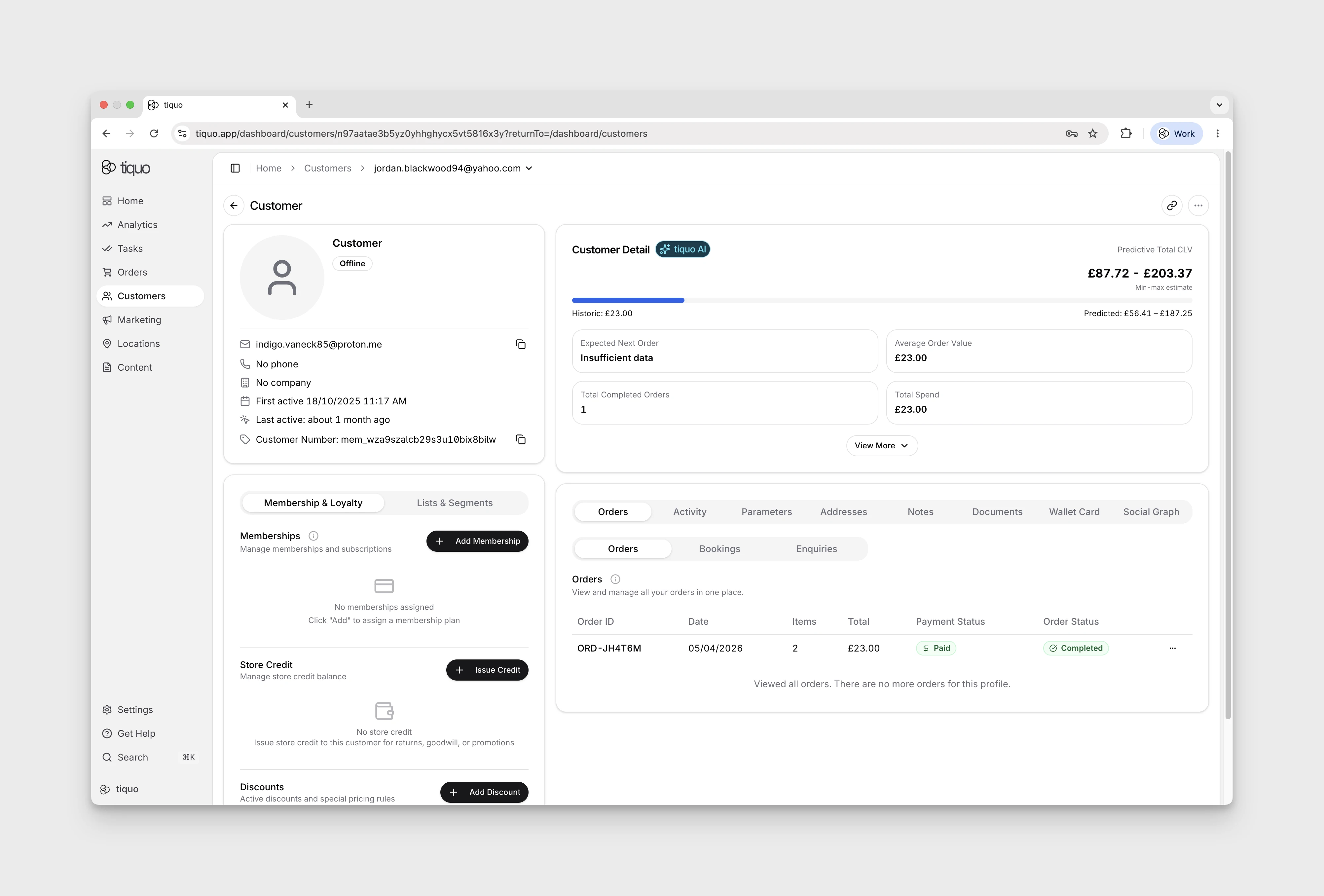
Store credit is accessed from a customer or company profile.
Open the customer or company profile and go to the Store Credit section to view the current balance, issue new credit, or review past transactions.
Store credit balances
Store credit is held as a balance per currency.
A single customer or company can hold balances in multiple currencies at the same time, for example a balance in GBP and a separate balance in EUR.
Each balance is tied to the currency it was issued in. Credit issued in one currency cannot be redeemed against an order placed in another currency.
Balances are denominated in the same currencies that are configured on the organization's sublocations.
Issuing store credit
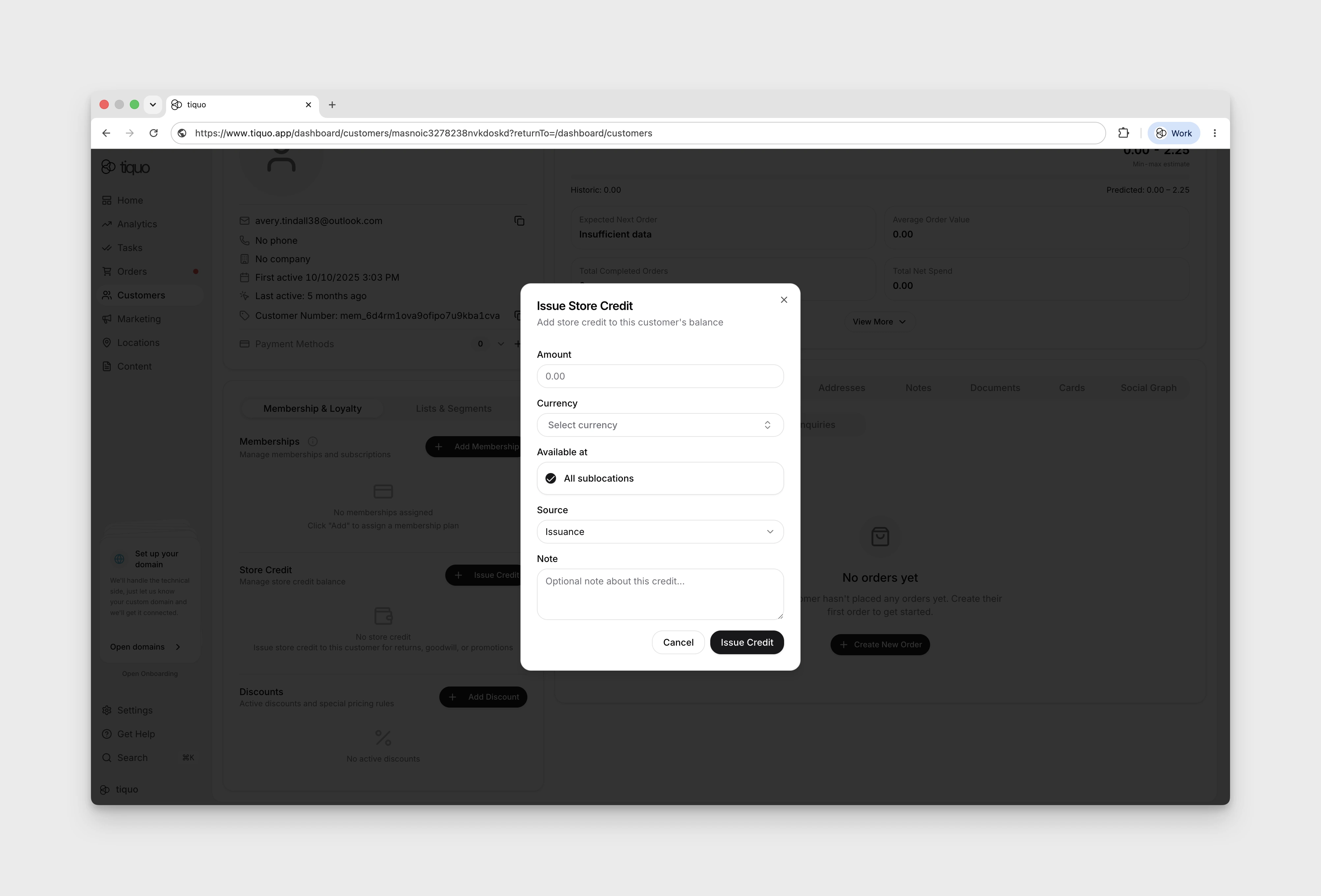
Staff with the appropriate permission can issue store credit from the customer or company profile.
When issuing credit, staff specify:
- Amount
- Currency
- Source (issuance or refund)
- Optional note for the audit trail
Issuance is used for goodwill credit, returns handled outside the order flow, promotional credit, and similar adjustments.
Store credit can be unrestricted or scoped to selected sublocations, individual products, and individual services through the eligibility picker. For example, a spa credit can be restricted to the Spa sublocation and selected treatments. Product-category scope is not available; select the eligible products or services explicitly when narrower scope is required.
Adjusting store credit
Staff can manually adjust an existing balance up or down.
Adjustments are recorded as a separate transaction type and require an optional note for context.
A balance cannot be adjusted below zero. Attempting to deduct more than the available balance is rejected.
Redeeming store credit on orders
Store credit is applied to orders during order creation.
When a customer or company is attached to a new order and has a balance in the order's currency, a Store credit available section appears on the order.
Staff can:
- Enter a custom amount to apply
- Apply the maximum amount, capped at the order total
- Clear the applied credit
The amount applied is shown as a deduction on the order, and the remaining amount due is updated accordingly.
Store credit can be applied as full or partial payment. Any remaining balance can be settled using another payment method such as card or cash.
If both a customer and a company are attached to an order, the customer's store credit balance is used.
Refunds to store credit
When refunding an order, staff can choose to issue the refund as store credit instead of returning funds to the original payment method.
Refunds issued as store credit create a new transaction on the customer or company balance and are labeled as refunds in the transaction history.
The original redemption transaction remains in the ledger. Refunds are recorded as new entries rather than reversals.
Memberships and store credit
Membership plans can include an initial store credit allocation.
When a membership plan with initial store credit is assigned to a customer or company, the configured amount is automatically issued to their balance in the plan's currency.
The initial credit is issued once per membership assignment and is not re-issued on renewal.
The transaction is labeled as an issuance with a note referencing the membership plan.
Transaction history
Every store credit action is recorded in a transaction history viewable from the customer or company profile.
Each transaction records:
- Type (issuance, refund, adjustment, redemption, expired, consignment)
- Amount
- Currency
- Balance after the transaction
- Date and time
- Staff member who performed the action
- Optional note
- Linked order, where applicable
Transactions are immutable. Corrections are made by issuing a new adjustment rather than editing past entries.
Activity logging
Store credit events are also recorded in the organization's activity log.
This includes issuances, redemptions, adjustments, and refunds, with details of the customer or company, the amount, the currency, and the resulting balance.
Permissions
Issuing and adjusting store credit is controlled by a dedicated permission.
By default, only administrators can issue or adjust store credit. The permission can be granted to other roles from the team permissions settings.
Staff with customer view access can see balances and transaction history without needing the issue permission.
Limits and constraints
- Balances cannot go below zero
- Credit cannot be redeemed across currencies
- Store credit cannot be transferred directly between customers or between companies
- Store credit does not expire automatically. Expiry is handled manually by staff if required