

Admin API
Server-side API for managing your organization data
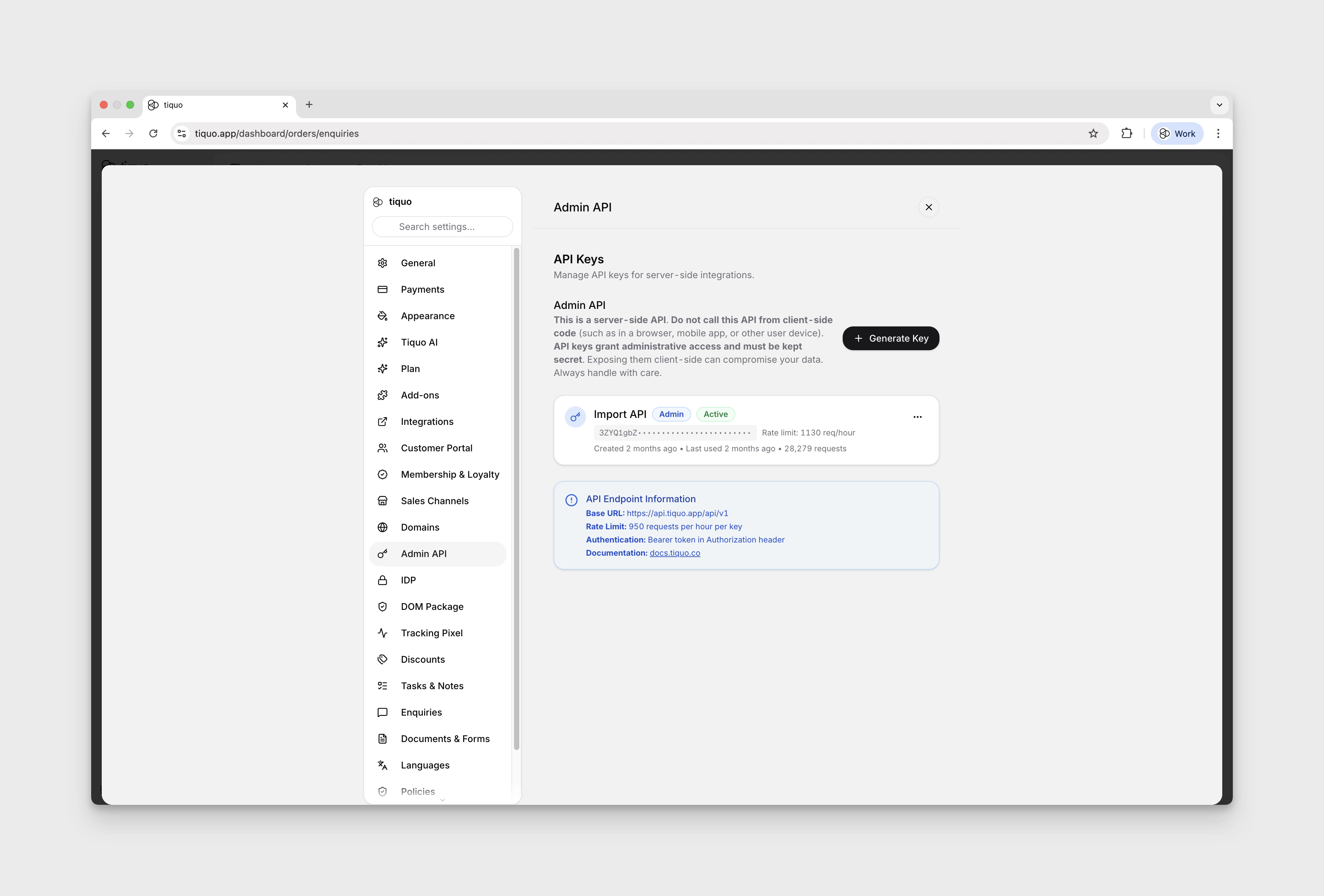
The Admin API gives backend systems permission-scoped access to your organization's data on Tiquo. Use it to build integrations, sync data with other platforms, automate workflows, and more.
Base URL
https://api.tiquo.app/api/v1Authentication
All Admin API requests require an API key in the Authorization header:
curl -X GET "https://api.tiquo.app/api/v1/customers/CUST-000001" \
  -H "Authorization: Bearer your_api_key_here"
API keys are organization-scoped. You can create and manage them from Settings > Admin API in your Tiquo dashboard.
Permissions
Each key has a set of read and write permissions per resource, such as customers.read and customers.write. GET endpoints need the resource's read permission, and POST, PATCH, and DELETE endpoints need its write permission. A write permission does not include read, so a key that both creates and looks up customers needs customers.read and customers.write. A request without the permission it needs returns 403 with "API key does not have permission for this operation".
Browser requests
The Admin API is intended for server-side integrations. Browser CORS is limited to https://docs.tiquo.co, https://tiquo.app, and https://www.tiquo.app so the documentation testers can call it. API-key permissions and any origin or IP restrictions still apply.
The current preflight response allows GET, POST, and PATCH, but does not allow DELETE. Use a server-side client or curl for DELETE operations; the browser tester cannot execute them.
Rate limits
The default limit is 1,000 requests per API key in a fixed one-hour window. If you exceed it, the API returns 429 Too Many Requests until the current window resets.
Contact Tiquo if your integration needs a higher rate limit. Rate limits cannot be changed from the dashboard.
Available endpoints
| Resource | Endpoints | Status |
|---|---|---|
| Customers | GET /customers, POST /customers, GET /customers/{customerId}, PATCH /customers/{customerId}, GET /customers/{customerId}/store-credit, POST /customers/{customerId}/store-credit | Available |
| Companies | GET /companies, POST /companies, GET /companies/{companyId}, PATCH /companies/{companyId}, POST /companies/{companyId}/store-credit | Available |
| Orders | GET /orders, POST /orders, GET /orders/{orderId}, PATCH /orders/{orderId}, DELETE /orders/{orderId} | Available |
| Bookings | GET /bookings, POST /bookings, GET /bookings/{bookingId}, PATCH /bookings/{bookingId}, DELETE /bookings/{bookingId}, GET /bookings/{bookingId}/ticket | Available |
| Enquiries | GET /enquiries, POST /enquiries, GET /enquiries/{enquiryId}, PATCH /enquiries/{enquiryId}, DELETE /enquiries/{enquiryId} | Available |
| Tasks | GET /tasks, POST /tasks, GET /tasks/{taskId}, PATCH /tasks/{taskId}, DELETE /tasks/{taskId} | Available |
| Metadata | GET /metadata/enquiries, GET /metadata/customer-parameters, GET /metadata/options/{kind} | Available |
| Account and webhook subscriptions | GET /account, POST /zapier/subscriptions, DELETE /zapier/subscriptions/{subscriptionId} | Available |
Complete API reference
The reference below is generated directly from the production OpenAPI contract. It contains every currently deployed operation, parameter, request body, response, and schema. Enter your Admin API key in an operation's authorization field to test it directly from this page.
The tester sends requests to the live production API. POST, PATCH, and DELETE operations change organization data. Browser DELETE requests are currently blocked by CORS; use a server-side client or curl. Your API key is stored only in this browser's local storage, so use the tester on a trusted device.
Authorization
BearerAuth API key from the Tiquo dashboard (Settings > Developer > Admin API)
In: header
Response Body
application/json
application/json
application/json
curl -X GET "https://api.tiquo.app/api/v1/account"{
"success": true,
"data": {
"id": "string",
"name": "string",
"slug": "string",
"permissions": [
"string"
]
},
"timestamp": "2019-08-24T14:15:22Z"
}{
"success": false,
"error": "string",
"timestamp": "2019-08-24T14:15:22Z"
}{
"success": false,
"error": "string",
"timestamp": "2019-08-24T14:15:22Z"
}Authorization
BearerAuth API key from the Tiquo dashboard (Settings > Developer > Admin API)
In: header
Request Body
application/json
"customer.created" | "company.created" | "order.created" | "booking.created" | "booking.confirmed" | "enquiry.created" | "task.created"1 <= itemsUnique HTTPS callback URL issued by hooks.zapier.com.
uriResponse Body
application/json
application/json
application/json
application/json
application/json
curl -X POST "https://api.tiquo.app/api/v1/zapier/subscriptions" \ -H "Content-Type: application/json" \ -d '{ "targetUrl": "http://example.com" }'{
"success": true,
"data": {
"id": "string",
"unsubscribeToken": "string"
},
"timestamp": "2019-08-24T14:15:22Z"
}{
"success": false,
"error": "string",
"timestamp": "2019-08-24T14:15:22Z"
}{
"success": false,
"error": "string",
"timestamp": "2019-08-24T14:15:22Z"
}{
"success": false,
"error": "string",
"timestamp": "2019-08-24T14:15:22Z"
}{
"success": false,
"error": "string",
"timestamp": "2019-08-24T14:15:22Z"
}Path Parameters
Header Parameters
Opaque token returned when the subscription was created.
Response Body
application/json
application/json
application/json
application/json
curl -X DELETE "https://api.tiquo.app/api/v1/zapier/subscriptions/string" \ -H "X-Tiquo-Unsubscribe-Token: string"{
"success": true,
"data": {
"id": "string",
"deleted": true
},
"timestamp": "2019-08-24T14:15:22Z"
}{
"success": false,
"error": "string",
"timestamp": "2019-08-24T14:15:22Z"
}{
"success": false,
"error": "string",
"timestamp": "2019-08-24T14:15:22Z"
}{
"success": false,
"error": "string",
"timestamp": "2019-08-24T14:15:22Z"
}Authorization
BearerAuth API key from the Tiquo dashboard (Settings > Developer > Admin API)
In: header
Query Parameters
501 <= value <= 100Opaque continuation cursor returned by the previous page.
Pagination cursor from a previous response
Full-text search across name, email, phone, customer number. Cannot be combined with parameterId/parameterName.
"active" | "inactive" | "banned"Filter to customers that have this parameter set. Use the system parameter ID (e.g. "system_marketing_opt_in") or the schema document ID for custom parameters. Cannot be combined with search.
Filter to customers that have this parameter set, looked up by name (e.g. "Marketing Opt-In"). Alternative to parameterId. Cannot be combined with search.
When combined with parameterId or parameterName, only return customers whose parameter matches this exact value.
Response Body
application/json
application/json
application/json
application/json
curl -X GET "https://api.tiquo.app/api/v1/customers"{
"success": true,
"data": [
{
"id": "string",
"customerNumber": "string",
"firstName": "string",
"lastName": "string",
"displayName": "string",
"title": "mr",
"customTitle": "string",
"nickname": "string",
"emails": [
{
"address": "user@example.com",
"isPrimary": true
}
],
"phones": [
{
"number": "string",
"isPrimary": true
}
],
"profilePhoto": "string",
"status": "active",
"source": "string",
"totalOrders": 0,
"totalSpent": 0,
"averageOrderValue": 0,
"lifetimeValue": 0,
"lastOrderDate": 0,
"lastActivityDate": 0,
"createdAt": 0,
"updatedAt": 0
}
],
"pagination": {
"hasMore": true,
"nextCursor": "string",
"pageSize": 0
},
"timestamp": "2019-08-24T14:15:22Z"
}{
"success": false,
"error": "string",
"timestamp": "2019-08-24T14:15:22Z"
}{
"success": false,
"error": "string",
"timestamp": "2019-08-24T14:15:22Z"
}{
"success": false,
"error": "string",
"timestamp": "2019-08-24T14:15:22Z"
}Authorization
BearerAuth API key from the Tiquo dashboard (Settings > Developer > Admin API)
In: header
Request Body
application/json
Customer parameter updates keyed by system ID, custom schema ID, name, or normalized name. Requires customers.write and staff-editable parameters. Submitted values replace existing values; omitted or null values are unchanged. Use an empty string or empty array to clear optional values. Select/multiselect values must match active configured options. Compound values use a JSON string. Consent accepts true/false and records the opt-in date automatically. Invalid values or inaccessible schemas reject the entire customer write with HTTP 400.
A title code (mr, mrs, ms, miss, mx, dr, prof; "Mr." also works) or any other text, which is stored as a custom title. An empty string or null clears the title.
Custom title text, used with title "other".
Empty string or null clears.
Custom ID (5-32 chars). Auto-generated if omitted.
"active""active" | "inactive" | "banned""admin"uriResponse Body
application/json
application/json
application/json
application/json
application/json
curl -X POST "https://api.tiquo.app/api/v1/customers" \ -H "Content-Type: application/json" \ -d '{}'{
"success": true,
"data": {
"id": "string",
"customerNumber": "string",
"firstName": "string",
"lastName": "string",
"displayName": "string",
"title": "mr",
"customTitle": "string",
"nickname": "string",
"emails": [
{
"address": "user@example.com",
"isPrimary": true
}
],
"phones": [
{
"number": "string",
"isPrimary": true
}
],
"profilePhoto": "string",
"status": "active",
"source": "string",
"totalOrders": 0,
"totalSpent": 0,
"averageOrderValue": 0,
"lifetimeValue": 0,
"lastOrderDate": 0,
"lastActivityDate": 0,
"createdAt": 0,
"updatedAt": 0,
"marketingOptIn": true,
"smsOptIn": true
},
"timestamp": "2019-08-24T14:15:22Z"
}{
"success": false,
"error": "string",
"timestamp": "2019-08-24T14:15:22Z"
}{
"success": false,
"error": "string",
"timestamp": "2019-08-24T14:15:22Z"
}{
"success": false,
"error": "string",
"timestamp": "2019-08-24T14:15:22Z"
}{
"success": false,
"error": "string",
"timestamp": "2019-08-24T14:15:22Z"
}Authorization
BearerAuth API key from the Tiquo dashboard (Settings > Developer > Admin API)
In: header
Path Parameters
Customer number, email, phone, or document ID
Response Body
application/json
application/json
application/json
application/json
curl -X GET "https://api.tiquo.app/api/v1/customers/string"{
"success": true,
"data": {
"id": "string",
"customerNumber": "string",
"firstName": "string",
"lastName": "string",
"displayName": "string",
"title": "mr",
"customTitle": "string",
"nickname": "string",
"emails": [
{
"address": "user@example.com",
"isPrimary": true
}
],
"phones": [
{
"number": "string",
"isPrimary": true
}
],
"profilePhoto": "string",
"status": "active",
"source": "string",
"totalOrders": 0,
"totalSpent": 0,
"averageOrderValue": 0,
"lifetimeValue": 0,
"lastOrderDate": 0,
"lastActivityDate": 0,
"createdAt": 0,
"updatedAt": 0,
"marketingOptIn": true,
"smsOptIn": true
},
"timestamp": "2019-08-24T14:15:22Z"
}{
"success": false,
"error": "string",
"timestamp": "2019-08-24T14:15:22Z"
}{
"success": false,
"error": "string",
"timestamp": "2019-08-24T14:15:22Z"
}{
"success": false,
"error": "string",
"timestamp": "2019-08-24T14:15:22Z"
}Authorization
BearerAuth API key from the Tiquo dashboard (Settings > Developer > Admin API)
In: header
Path Parameters
Customer number or document ID
Request Body
application/json
Customer parameter updates keyed by system ID, custom schema ID, name, or normalized name. Requires customers.write and staff-editable parameters. Submitted values replace existing values; omitted or null values are unchanged. Use an empty string or empty array to clear optional values. Select/multiselect values must match active configured options. Compound values use a JSON string. Consent accepts true/false and records the opt-in date automatically. Invalid values or inaccessible schemas reject the entire customer write with HTTP 400.
A title code (mr, mrs, ms, miss, mx, dr, prof; "Mr." also works) or any other text, which is stored as a custom title. An empty string or null clears the title.
Custom title text, used with title "other".
Empty string or null clears.
"active" | "inactive" | "banned"URL, data-URI, or empty string to remove
Raw base64-encoded image (alternative to profilePhoto)
MIME type when using profilePhotoBase64 (e.g. image/png)
Response Body
application/json
application/json
application/json
application/json
application/json
application/json
curl -X PATCH "https://api.tiquo.app/api/v1/customers/string" \ -H "Content-Type: application/json" \ -d '{}'{
"success": true,
"data": {
"id": "string",
"customerNumber": "string",
"firstName": "string",
"lastName": "string",
"displayName": "string",
"title": "mr",
"customTitle": "string",
"nickname": "string",
"emails": [
{
"address": "user@example.com",
"isPrimary": true
}
],
"phones": [
{
"number": "string",
"isPrimary": true
}
],
"profilePhoto": "string",
"status": "active",
"source": "string",
"totalOrders": 0,
"totalSpent": 0,
"averageOrderValue": 0,
"lifetimeValue": 0,
"lastOrderDate": 0,
"lastActivityDate": 0,
"createdAt": 0,
"updatedAt": 0,
"marketingOptIn": true,
"smsOptIn": true
},
"timestamp": "2019-08-24T14:15:22Z"
}{
"success": false,
"error": "string",
"timestamp": "2019-08-24T14:15:22Z"
}{
"success": false,
"error": "string",
"timestamp": "2019-08-24T14:15:22Z"
}{
"success": false,
"error": "string",
"timestamp": "2019-08-24T14:15:22Z"
}{
"success": false,
"error": "string",
"timestamp": "2019-08-24T14:15:22Z"
}{
"success": false,
"error": "string",
"timestamp": "2019-08-24T14:15:22Z"
}Authorization
BearerAuth API key from the Tiquo dashboard (Settings > Developer > Admin API)
In: header
Path Parameters
Customer number or document ID
Query Parameters
Optional 3-letter ISO currency code to return one balance.
^[A-Za-z]{3}$3 <= length <= 3Response Body
application/json
application/json
application/json
application/json
application/json
curl -X GET "https://api.tiquo.app/api/v1/customers/string/store-credit"{
"success": true,
"data": {
"customerId": "string",
"customerNumber": "string",
"balances": [
{
"currency": "GBP",
"balance": 25.5
}
],
"totalCurrencies": 0
},
"timestamp": "2019-08-24T14:15:22Z"
}{
"success": false,
"error": "string",
"timestamp": "2019-08-24T14:15:22Z"
}{
"success": false,
"error": "string",
"timestamp": "2019-08-24T14:15:22Z"
}{
"success": false,
"error": "string",
"timestamp": "2019-08-24T14:15:22Z"
}{
"success": false,
"error": "string",
"timestamp": "2019-08-24T14:15:22Z"
}Authorization
BearerAuth API key from the Tiquo dashboard (Settings > Developer > Admin API)
In: header
Path Parameters
Customer number or document ID
Header Parameters
Unique key for this store-credit issuance attempt. Reusing the same key with the same request returns the original transaction; reusing it with different request details returns 409.
^[A-Za-z0-9._:-]+$1 <= length <= 128Request Body
application/json
Positive amount to add to the balance.
0.010 < value <= 1000000^[A-Za-z]{3}$3 <= length <= 3Optional note for the ledger entry.
length <= 500Response Body
application/json
application/json
application/json
application/json
application/json
application/json
application/json
application/json
curl -X POST "https://api.tiquo.app/api/v1/customers/string/store-credit" \ -H "Idempotency-Key: string" \ -H "Content-Type: application/json" \ -d '{ "amount": 1000000, "currency": "GBP" }'{
"success": true,
"data": {
"id": "string",
"entityType": "customer",
"customerId": "string",
"companyId": "string",
"currency": "string",
"type": "issued",
"amount": 0,
"balanceAfter": 0,
"note": "string",
"idempotencyKey": "string",
"createdAt": 0,
"idempotentReplay": true
},
"timestamp": "2019-08-24T14:15:22Z"
}{
"success": true,
"data": {
"id": "string",
"entityType": "customer",
"customerId": "string",
"companyId": "string",
"currency": "string",
"type": "issued",
"amount": 0,
"balanceAfter": 0,
"note": "string",
"idempotencyKey": "string",
"createdAt": 0,
"idempotentReplay": true
},
"timestamp": "2019-08-24T14:15:22Z"
}{
"success": false,
"error": "string",
"timestamp": "2019-08-24T14:15:22Z"
}{
"success": false,
"error": "string",
"timestamp": "2019-08-24T14:15:22Z"
}{
"success": false,
"error": "string",
"timestamp": "2019-08-24T14:15:22Z"
}{
"success": false,
"error": "string",
"timestamp": "2019-08-24T14:15:22Z"
}{
"success": false,
"error": "string",
"timestamp": "2019-08-24T14:15:22Z"
}{
"success": false,
"error": "string",
"timestamp": "2019-08-24T14:15:22Z"
}Authorization
BearerAuth API key from the Tiquo dashboard (Settings > Developer > Admin API)
In: header
Query Parameters
501 <= value <= 100"active" | "inactive" | "archived""client" | "prospect" | "vendor" | "partner" | "other"Response Body
application/json
application/json
application/json
curl -X GET "https://api.tiquo.app/api/v1/companies"{
"success": true,
"data": [
{
"id": "string",
"companyNumber": "string",
"name": "string",
"displayName": "string",
"email": "string",
"phone": "string",
"website": "string",
"websites": [
"string"
],
"emailDomains": [
"string"
],
"status": "active",
"tags": [
"string"
],
"totalCustomers": 0,
"totalOrders": 0,
"totalRevenue": 0,
"lastOrderDate": 0,
"lastActivityDate": 0,
"createdAt": 0,
"updatedAt": 0
}
],
"pagination": {
"hasMore": true,
"nextCursor": "string",
"pageSize": 0
},
"timestamp": "2019-08-24T14:15:22Z"
}{
"success": false,
"error": "string",
"timestamp": "2019-08-24T14:15:22Z"
}{
"success": false,
"error": "string",
"timestamp": "2019-08-24T14:15:22Z"
}Authorization
BearerAuth API key from the Tiquo dashboard (Settings > Developer > Admin API)
In: header
Request Body
application/json
emailuri"active" | "inactive" | "archived""client" | "prospect" | "vendor" | "partner" | "other"Response Body
application/json
application/json
application/json
application/json
application/json
application/json
curl -X POST "https://api.tiquo.app/api/v1/companies" \ -H "Content-Type: application/json" \ -d '{ "name": "string" }'{
"success": true,
"data": {
"id": "string",
"companyNumber": "string",
"name": "string",
"displayName": "string",
"email": "string",
"phone": "string",
"website": "string",
"websites": [
"string"
],
"emailDomains": [
"string"
],
"status": "active",
"tags": [
"string"
],
"totalCustomers": 0,
"totalOrders": 0,
"totalRevenue": 0,
"lastOrderDate": 0,
"lastActivityDate": 0,
"createdAt": 0,
"updatedAt": 0,
"description": "string",
"logo": "string",
"address": {
"line1": "string",
"line2": "string",
"city": "string",
"state": "string",
"postalCode": "string",
"country": "string"
},
"industry": "string",
"companySize": "1-10",
"type": "client",
"notes": "string"
},
"timestamp": "2019-08-24T14:15:22Z"
}{
"success": false,
"error": "string",
"timestamp": "2019-08-24T14:15:22Z"
}{
"success": false,
"error": "string",
"timestamp": "2019-08-24T14:15:22Z"
}{
"success": false,
"error": "string",
"timestamp": "2019-08-24T14:15:22Z"
}{
"success": false,
"error": "string",
"timestamp": "2019-08-24T14:15:22Z"
}{
"success": false,
"error": "string",
"timestamp": "2019-08-24T14:15:22Z"
}Authorization
BearerAuth API key from the Tiquo dashboard (Settings > Developer > Admin API)
In: header
Path Parameters
Company number, email, document ID, or name
Response Body
application/json
application/json
application/json
application/json
curl -X GET "https://api.tiquo.app/api/v1/companies/string"{
"success": true,
"data": {
"id": "string",
"companyNumber": "string",
"name": "string",
"displayName": "string",
"email": "string",
"phone": "string",
"website": "string",
"websites": [
"string"
],
"emailDomains": [
"string"
],
"status": "active",
"tags": [
"string"
],
"totalCustomers": 0,
"totalOrders": 0,
"totalRevenue": 0,
"lastOrderDate": 0,
"lastActivityDate": 0,
"createdAt": 0,
"updatedAt": 0,
"description": "string",
"logo": "string",
"address": {
"line1": "string",
"line2": "string",
"city": "string",
"state": "string",
"postalCode": "string",
"country": "string"
},
"industry": "string",
"companySize": "1-10",
"type": "client",
"notes": "string"
},
"timestamp": "2019-08-24T14:15:22Z"
}{
"success": false,
"error": "string",
"timestamp": "2019-08-24T14:15:22Z"
}{
"success": false,
"error": "string",
"timestamp": "2019-08-24T14:15:22Z"
}{
"success": false,
"error": "string",
"timestamp": "2019-08-24T14:15:22Z"
}Authorization
BearerAuth API key from the Tiquo dashboard (Settings > Developer > Admin API)
In: header
Path Parameters
Company number or document ID
Request Body
application/json
emailuriURL, data-URI, or empty string to remove
Raw base64-encoded image (alternative to logo)
MIME type when using logoBase64 (e.g. image/png)
"1-10" | "11-50" | "51-200" | "201-500" | "501-1000" | "1000+""active" | "inactive" | "archived""client" | "prospect" | "vendor" | "partner" | "other"Response Body
application/json
application/json
application/json
application/json
application/json
curl -X PATCH "https://api.tiquo.app/api/v1/companies/string" \ -H "Content-Type: application/json" \ -d '{}'{
"success": true,
"data": {
"id": "string",
"companyNumber": "string",
"name": "string",
"displayName": "string",
"email": "string",
"phone": "string",
"website": "string",
"websites": [
"string"
],
"emailDomains": [
"string"
],
"status": "active",
"tags": [
"string"
],
"totalCustomers": 0,
"totalOrders": 0,
"totalRevenue": 0,
"lastOrderDate": 0,
"lastActivityDate": 0,
"createdAt": 0,
"updatedAt": 0,
"description": "string",
"logo": "string",
"address": {
"line1": "string",
"line2": "string",
"city": "string",
"state": "string",
"postalCode": "string",
"country": "string"
},
"industry": "string",
"companySize": "1-10",
"type": "client",
"notes": "string"
},
"timestamp": "2019-08-24T14:15:22Z"
}{
"success": false,
"error": "string",
"timestamp": "2019-08-24T14:15:22Z"
}{
"success": false,
"error": "string",
"timestamp": "2019-08-24T14:15:22Z"
}{
"success": false,
"error": "string",
"timestamp": "2019-08-24T14:15:22Z"
}{
"success": false,
"error": "string",
"timestamp": "2019-08-24T14:15:22Z"
}Authorization
BearerAuth API key from the Tiquo dashboard (Settings > Developer > Admin API)
In: header
Path Parameters
Company number or document ID
Header Parameters
Unique key for this store-credit issuance attempt. Reusing the same key with the same request returns the original transaction; reusing it with different request details returns 409.
^[A-Za-z0-9._:-]+$1 <= length <= 128Request Body
application/json
Positive amount to add to the balance.
0.010 < value <= 1000000^[A-Za-z]{3}$3 <= length <= 3Optional note for the ledger entry.
length <= 500Response Body
application/json
application/json
application/json
application/json
application/json
application/json
application/json
application/json
curl -X POST "https://api.tiquo.app/api/v1/companies/string/store-credit" \ -H "Idempotency-Key: string" \ -H "Content-Type: application/json" \ -d '{ "amount": 1000000, "currency": "GBP" }'{
"success": true,
"data": {
"id": "string",
"entityType": "customer",
"customerId": "string",
"companyId": "string",
"currency": "string",
"type": "issued",
"amount": 0,
"balanceAfter": 0,
"note": "string",
"idempotencyKey": "string",
"createdAt": 0,
"idempotentReplay": true
},
"timestamp": "2019-08-24T14:15:22Z"
}{
"success": true,
"data": {
"id": "string",
"entityType": "customer",
"customerId": "string",
"companyId": "string",
"currency": "string",
"type": "issued",
"amount": 0,
"balanceAfter": 0,
"note": "string",
"idempotencyKey": "string",
"createdAt": 0,
"idempotentReplay": true
},
"timestamp": "2019-08-24T14:15:22Z"
}{
"success": false,
"error": "string",
"timestamp": "2019-08-24T14:15:22Z"
}{
"success": false,
"error": "string",
"timestamp": "2019-08-24T14:15:22Z"
}{
"success": false,
"error": "string",
"timestamp": "2019-08-24T14:15:22Z"
}{
"success": false,
"error": "string",
"timestamp": "2019-08-24T14:15:22Z"
}{
"success": false,
"error": "string",
"timestamp": "2019-08-24T14:15:22Z"
}{
"success": false,
"error": "string",
"timestamp": "2019-08-24T14:15:22Z"
}Authorization
BearerAuth API key from the Tiquo dashboard (Settings > Developer > Admin API)
In: header
Query Parameters
501 <= value <= 100Search by order number, customer name/email
Comma-separated: draft,pending,processing,completed,cancelled,refunded,open_tab
Comma-separated payment statuses
emailFilter by order createdAt, inclusive
datedate0 <= valueFilter by order createdAt, inclusive
0 <= valueReturn orders whose updatedAt is strictly after this instant. Results are ordered by updatedAt ascending so integrations can follow all pagination cursors and then advance their update watermark. Cannot be combined with search.
date-timeResponse Body
application/json
application/json
application/json
curl -X GET "https://api.tiquo.app/api/v1/orders"{
"success": true,
"data": [
{
"id": "string",
"orderNumber": "string",
"status": "draft",
"paymentStatus": "pending",
"source": "string",
"channel": "string",
"total": 0,
"subtotal": 0,
"tax": 0,
"discount": 0,
"discountName": "string",
"serviceChargeAmount": 0,
"serviceChargePercentage": 0,
"serviceChargeRemoved": true,
"payments": [
{
"id": "string",
"method": "string",
"provider": "stripe",
"amount": 0,
"currency": "GBP",
"paymentIntentId": "string",
"chargeId": "string",
"cardBrand": "visa",
"cardLast4": "4242",
"walletType": "apple_pay",
"paidAt": 0
}
],
"storeCredit": {
"amount": 0,
"currency": "string"
},
"tipAmount": 0,
"currency": "string",
"itemCount": 0,
"customerId": "string",
"customerName": "string",
"customerEmail": "string",
"staffId": "string",
"staffName": "string",
"locationId": "string",
"locationName": "string",
"sublocationId": "string",
"sublocationName": "string",
"covers": 0,
"tableNumber": "string",
"tableName": "string",
"tables": [
{
"id": "string",
"number": "string",
"name": "string"
}
],
"refundAmount": 0,
"createdAt": 0,
"updatedAt": 0
}
],
"pagination": {
"hasMore": true,
"nextCursor": "string",
"pageSize": 0
},
"timestamp": "2019-08-24T14:15:22Z"
}{
"success": false,
"error": "string",
"timestamp": "2019-08-24T14:15:22Z"
}{
"success": false,
"error": "string",
"timestamp": "2019-08-24T14:15:22Z"
}Authorization
BearerAuth API key from the Tiquo dashboard (Settings > Developer > Admin API)
In: header
Request Body
application/json
"admin""pos" | "online" | "admin""zapier""eat_in" | "take_away""draft""draft" | "pending" | "processing" | "completed" | "cancelled" | "refunded" | "open_tab" | "lost_cart"1 <= itemsResponse Body
application/json
application/json
application/json
application/json
application/json
application/json
curl -X POST "https://api.tiquo.app/api/v1/orders" \ -H "Content-Type: application/json" \ -d '{ "sublocationId": "string", "items": [ { "name": "string", "quantity": 0, "unitPrice": 0 } ] }'{
"success": true,
"data": {
"id": "string",
"orderNumber": "string",
"status": "draft",
"paymentStatus": "pending",
"source": "string",
"channel": "string",
"total": 0,
"subtotal": 0,
"tax": 0,
"discount": 0,
"discountName": "string",
"serviceChargeAmount": 0,
"serviceChargePercentage": 0,
"serviceChargeRemoved": true,
"payments": [
{
"id": "string",
"method": "string",
"provider": "stripe",
"amount": 0,
"currency": "GBP",
"paymentIntentId": "string",
"chargeId": "string",
"cardBrand": "visa",
"cardLast4": "4242",
"walletType": "apple_pay",
"paidAt": 0
}
],
"storeCredit": {
"amount": 0,
"currency": "string"
},
"tipAmount": 0,
"currency": "string",
"itemCount": 0,
"customerId": "string",
"customerName": "string",
"customerEmail": "string",
"staffId": "string",
"staffName": "string",
"locationId": "string",
"locationName": "string",
"sublocationId": "string",
"sublocationName": "string",
"covers": 0,
"tableNumber": "string",
"tableName": "string",
"tables": [
{
"id": "string",
"number": "string",
"name": "string"
}
],
"refundAmount": 0,
"createdAt": 0,
"updatedAt": 0,
"paymentMethod": "string",
"shipping": 0,
"items": [
{
"id": "line_1",
"type": "product",
"name": "House Red",
"quantity": 2,
"unitPrice": 9.5,
"subtotal": 19,
"tax": 3.17,
"taxRate": 20,
"discount": 0,
"total": 19,
"sku": "HOUSE-RED",
"productId": "k57a2b9x8c4d6e0f1g2h3j4k5m6n7p8q",
"categoryName": "Wine / Red Wine",
"reportingCategory": "Wine / Red Wine",
"variant": {
"id": "k97b3c0y9d5e7f1g2h3j4k5m6n7p8q9r",
"name": "175ml"
},
"variants": [
{
"id": "k97b3c0y9d5e7f1g2h3j4k5m6n7p8q9r",
"name": "175ml"
}
],
"category": {
"id": "k17c4d1z0e6f8g2h3j4k5m6n7p8q9r0s",
"name": "Wine"
},
"subcategory": {
"id": "k27d5e2a1f7g9h3j4k5m6n7p8q9r0s1t",
"name": "Red Wine"
},
"categoryPath": [
{
"id": "k17c4d1z0e6f8g2h3j4k5m6n7p8q9r0s",
"name": "Wine"
},
{
"id": "k27d5e2a1f7g9h3j4k5m6n7p8q9r0s1t",
"name": "Red Wine"
}
],
"productStatus": "delivered"
}
],
"discountCodes": [
"string"
],
"customerNotes": "string",
"refundReason": "string",
"isLegacy": true,
"creationMethod": "customer_online",
"completedAt": 0,
"cancelledAt": 0
},
"timestamp": "2019-08-24T14:15:22Z"
}{
"success": false,
"error": "string",
"timestamp": "2019-08-24T14:15:22Z"
}{
"success": false,
"error": "string",
"timestamp": "2019-08-24T14:15:22Z"
}{
"success": false,
"error": "string",
"timestamp": "2019-08-24T14:15:22Z"
}{
"success": false,
"error": "string",
"timestamp": "2019-08-24T14:15:22Z"
}{
"success": false,
"error": "string",
"timestamp": "2019-08-24T14:15:22Z"
}Authorization
BearerAuth API key from the Tiquo dashboard (Settings > Developer > Admin API)
In: header
Path Parameters
Order number or document ID
Response Body
application/json
application/json
application/json
application/json
curl -X GET "https://api.tiquo.app/api/v1/orders/string"{
"success": true,
"data": {
"id": "string",
"orderNumber": "string",
"status": "draft",
"paymentStatus": "pending",
"source": "string",
"channel": "string",
"total": 0,
"subtotal": 0,
"tax": 0,
"discount": 0,
"discountName": "string",
"serviceChargeAmount": 0,
"serviceChargePercentage": 0,
"serviceChargeRemoved": true,
"payments": [
{
"id": "string",
"method": "string",
"provider": "stripe",
"amount": 0,
"currency": "GBP",
"paymentIntentId": "string",
"chargeId": "string",
"cardBrand": "visa",
"cardLast4": "4242",
"walletType": "apple_pay",
"paidAt": 0
}
],
"storeCredit": {
"amount": 0,
"currency": "string"
},
"tipAmount": 0,
"currency": "string",
"itemCount": 0,
"customerId": "string",
"customerName": "string",
"customerEmail": "string",
"staffId": "string",
"staffName": "string",
"locationId": "string",
"locationName": "string",
"sublocationId": "string",
"sublocationName": "string",
"covers": 0,
"tableNumber": "string",
"tableName": "string",
"tables": [
{
"id": "string",
"number": "string",
"name": "string"
}
],
"refundAmount": 0,
"createdAt": 0,
"updatedAt": 0,
"paymentMethod": "string",
"shipping": 0,
"items": [
{
"id": "line_1",
"type": "product",
"name": "House Red",
"quantity": 2,
"unitPrice": 9.5,
"subtotal": 19,
"tax": 3.17,
"taxRate": 20,
"discount": 0,
"total": 19,
"sku": "HOUSE-RED",
"productId": "k57a2b9x8c4d6e0f1g2h3j4k5m6n7p8q",
"categoryName": "Wine / Red Wine",
"reportingCategory": "Wine / Red Wine",
"variant": {
"id": "k97b3c0y9d5e7f1g2h3j4k5m6n7p8q9r",
"name": "175ml"
},
"variants": [
{
"id": "k97b3c0y9d5e7f1g2h3j4k5m6n7p8q9r",
"name": "175ml"
}
],
"category": {
"id": "k17c4d1z0e6f8g2h3j4k5m6n7p8q9r0s",
"name": "Wine"
},
"subcategory": {
"id": "k27d5e2a1f7g9h3j4k5m6n7p8q9r0s1t",
"name": "Red Wine"
},
"categoryPath": [
{
"id": "k17c4d1z0e6f8g2h3j4k5m6n7p8q9r0s",
"name": "Wine"
},
{
"id": "k27d5e2a1f7g9h3j4k5m6n7p8q9r0s1t",
"name": "Red Wine"
}
],
"productStatus": "delivered"
}
],
"discountCodes": [
"string"
],
"customerNotes": "string",
"refundReason": "string",
"isLegacy": true,
"creationMethod": "customer_online",
"completedAt": 0,
"cancelledAt": 0
},
"timestamp": "2019-08-24T14:15:22Z"
}{
"success": false,
"error": "string",
"timestamp": "2019-08-24T14:15:22Z"
}{
"success": false,
"error": "string",
"timestamp": "2019-08-24T14:15:22Z"
}{
"success": false,
"error": "string",
"timestamp": "2019-08-24T14:15:22Z"
}Authorization
BearerAuth API key from the Tiquo dashboard (Settings > Developer > Admin API)
In: header
Path Parameters
Request Body
application/json
"draft" | "pending" | "processing" | "completed" | "cancelled" | "refunded"Response Body
application/json
application/json
application/json
application/json
application/json
application/json
curl -X PATCH "https://api.tiquo.app/api/v1/orders/string" \ -H "Content-Type: application/json" \ -d '{ "status": "draft" }'{
"success": true,
"data": {
"id": "string",
"orderNumber": "string",
"status": "draft",
"paymentStatus": "pending",
"source": "string",
"channel": "string",
"total": 0,
"subtotal": 0,
"tax": 0,
"discount": 0,
"discountName": "string",
"serviceChargeAmount": 0,
"serviceChargePercentage": 0,
"serviceChargeRemoved": true,
"payments": [
{
"id": "string",
"method": "string",
"provider": "stripe",
"amount": 0,
"currency": "GBP",
"paymentIntentId": "string",
"chargeId": "string",
"cardBrand": "visa",
"cardLast4": "4242",
"walletType": "apple_pay",
"paidAt": 0
}
],
"storeCredit": {
"amount": 0,
"currency": "string"
},
"tipAmount": 0,
"currency": "string",
"itemCount": 0,
"customerId": "string",
"customerName": "string",
"customerEmail": "string",
"staffId": "string",
"staffName": "string",
"locationId": "string",
"locationName": "string",
"sublocationId": "string",
"sublocationName": "string",
"covers": 0,
"tableNumber": "string",
"tableName": "string",
"tables": [
{
"id": "string",
"number": "string",
"name": "string"
}
],
"refundAmount": 0,
"createdAt": 0,
"updatedAt": 0,
"paymentMethod": "string",
"shipping": 0,
"items": [
{
"id": "line_1",
"type": "product",
"name": "House Red",
"quantity": 2,
"unitPrice": 9.5,
"subtotal": 19,
"tax": 3.17,
"taxRate": 20,
"discount": 0,
"total": 19,
"sku": "HOUSE-RED",
"productId": "k57a2b9x8c4d6e0f1g2h3j4k5m6n7p8q",
"categoryName": "Wine / Red Wine",
"reportingCategory": "Wine / Red Wine",
"variant": {
"id": "k97b3c0y9d5e7f1g2h3j4k5m6n7p8q9r",
"name": "175ml"
},
"variants": [
{
"id": "k97b3c0y9d5e7f1g2h3j4k5m6n7p8q9r",
"name": "175ml"
}
],
"category": {
"id": "k17c4d1z0e6f8g2h3j4k5m6n7p8q9r0s",
"name": "Wine"
},
"subcategory": {
"id": "k27d5e2a1f7g9h3j4k5m6n7p8q9r0s1t",
"name": "Red Wine"
},
"categoryPath": [
{
"id": "k17c4d1z0e6f8g2h3j4k5m6n7p8q9r0s",
"name": "Wine"
},
{
"id": "k27d5e2a1f7g9h3j4k5m6n7p8q9r0s1t",
"name": "Red Wine"
}
],
"productStatus": "delivered"
}
],
"discountCodes": [
"string"
],
"customerNotes": "string",
"refundReason": "string",
"isLegacy": true,
"creationMethod": "customer_online",
"completedAt": 0,
"cancelledAt": 0
},
"timestamp": "2019-08-24T14:15:22Z"
}{
"success": false,
"error": "string",
"timestamp": "2019-08-24T14:15:22Z"
}{
"success": false,
"error": "string",
"timestamp": "2019-08-24T14:15:22Z"
}{
"success": false,
"error": "string",
"timestamp": "2019-08-24T14:15:22Z"
}{
"success": false,
"error": "string",
"timestamp": "2019-08-24T14:15:22Z"
}{
"success": false,
"error": "string",
"timestamp": "2019-08-24T14:15:22Z"
}Authorization
BearerAuth API key from the Tiquo dashboard (Settings > Developer > Admin API)
In: header
Path Parameters
Response Body
application/json
application/json
application/json
application/json
application/json
curl -X DELETE "https://api.tiquo.app/api/v1/orders/string"{
"success": false,
"error": "string",
"timestamp": "2019-08-24T14:15:22Z"
}{
"success": false,
"error": "string",
"timestamp": "2019-08-24T14:15:22Z"
}{
"success": false,
"error": "string",
"timestamp": "2019-08-24T14:15:22Z"
}{
"success": false,
"error": "string",
"timestamp": "2019-08-24T14:15:22Z"
}{
"success": false,
"error": "string",
"timestamp": "2019-08-24T14:15:22Z"
}Authorization
BearerAuth API key from the Tiquo dashboard (Settings > Developer > Admin API)
In: header
Query Parameters
501 <= value <= 100"low" | "medium" | "high" | "urgent"emailSearch by booking number, customer name/email
Comma-separated: draft,scheduled,confirmed,reminder_sent,waiting_room,waiting_list,checked_in,active,in_progress,completed,cancelled,no_show,rescheduled
datedateResponse Body
application/json
application/json
application/json
curl -X GET "https://api.tiquo.app/api/v1/bookings"{
"success": true,
"data": [
{
"id": "string",
"bookingNumber": "string",
"status": "draft",
"date": 0,
"startTime": "string",
"endTime": "string",
"duration": 0,
"attendeeCount": 0,
"source": "string",
"serviceId": "string",
"serviceName": "string",
"serviceGroupName": "string",
"sublocationId": "string",
"sublocationName": "string",
"customerId": "string",
"customerName": "string",
"customerEmail": "string",
"parentOrderId": "string",
"orderNumber": "string",
"orderValue": 0,
"orderPaymentStatus": "string",
"createdAt": 0,
"updatedAt": 0
}
],
"pagination": {
"hasMore": true,
"nextCursor": "string",
"pageSize": 0
},
"timestamp": "2019-08-24T14:15:22Z"
}{
"success": false,
"error": "string",
"timestamp": "2019-08-24T14:15:22Z"
}{
"success": false,
"error": "string",
"timestamp": "2019-08-24T14:15:22Z"
}Authorization
BearerAuth API key from the Tiquo dashboard (Settings > Developer > Admin API)
In: header
Request Body
application/json
0 < value1 <= value1 <= value0 <= value0 <= value0 <= value"admin""scheduled""scheduled"Response Body
application/json
application/json
application/json
application/json
application/json
application/json
curl -X POST "https://api.tiquo.app/api/v1/bookings" \ -H "Content-Type: application/json" \ -d '{ "serviceId": "string", "sublocationId": "string", "date": "2019-08-24T14:15:22Z", "duration": 0 }'{
"success": true,
"data": {
"id": "string",
"bookingNumber": "string",
"status": "draft",
"date": 0,
"startTime": "string",
"endTime": "string",
"duration": 0,
"attendeeCount": 0,
"source": "string",
"serviceId": "string",
"serviceName": "string",
"serviceGroupName": "string",
"sublocationId": "string",
"sublocationName": "string",
"customerId": "string",
"customerName": "string",
"customerEmail": "string",
"parentOrderId": "string",
"orderNumber": "string",
"orderValue": 0,
"orderPaymentStatus": "string",
"createdAt": 0,
"updatedAt": 0,
"timezone": "string",
"attendees": [
{
"name": "string",
"email": "string",
"phone": "string"
}
],
"customerNotes": "string",
"internalNotes": "string",
"isLegacy": true,
"completedAt": 0,
"cancelledAt": 0,
"checkedInAt": 0
},
"timestamp": "2019-08-24T14:15:22Z"
}{
"success": false,
"error": "string",
"timestamp": "2019-08-24T14:15:22Z"
}{
"success": false,
"error": "string",
"timestamp": "2019-08-24T14:15:22Z"
}{
"success": false,
"error": "string",
"timestamp": "2019-08-24T14:15:22Z"
}{
"success": false,
"error": "string",
"timestamp": "2019-08-24T14:15:22Z"
}{
"success": false,
"error": "string",
"timestamp": "2019-08-24T14:15:22Z"
}Authorization
BearerAuth API key from the Tiquo dashboard (Settings > Developer > Admin API)
In: header
Path Parameters
Booking number, confirmation code, or document ID
Response Body
application/json
application/json
application/json
application/json
curl -X GET "https://api.tiquo.app/api/v1/bookings/string"{
"success": true,
"data": {
"id": "string",
"bookingNumber": "string",
"status": "draft",
"date": 0,
"startTime": "string",
"endTime": "string",
"duration": 0,
"attendeeCount": 0,
"source": "string",
"serviceId": "string",
"serviceName": "string",
"serviceGroupName": "string",
"sublocationId": "string",
"sublocationName": "string",
"customerId": "string",
"customerName": "string",
"customerEmail": "string",
"parentOrderId": "string",
"orderNumber": "string",
"orderValue": 0,
"orderPaymentStatus": "string",
"createdAt": 0,
"updatedAt": 0,
"timezone": "string",
"attendees": [
{
"name": "string",
"email": "string",
"phone": "string"
}
],
"customerNotes": "string",
"internalNotes": "string",
"isLegacy": true,
"completedAt": 0,
"cancelledAt": 0,
"checkedInAt": 0
},
"timestamp": "2019-08-24T14:15:22Z"
}{
"success": false,
"error": "string",
"timestamp": "2019-08-24T14:15:22Z"
}{
"success": false,
"error": "string",
"timestamp": "2019-08-24T14:15:22Z"
}{
"success": false,
"error": "string",
"timestamp": "2019-08-24T14:15:22Z"
}Authorization
BearerAuth API key from the Tiquo dashboard (Settings > Developer > Admin API)
In: header
Path Parameters
Request Body
application/json
Response Body
application/json
application/json
application/json
application/json
application/json
application/json
curl -X PATCH "https://api.tiquo.app/api/v1/bookings/string" \ -H "Content-Type: application/json" \ -d '{ "status": "string" }'{
"success": true,
"data": {
"id": "string",
"bookingNumber": "string",
"status": "draft",
"date": 0,
"startTime": "string",
"endTime": "string",
"duration": 0,
"attendeeCount": 0,
"source": "string",
"serviceId": "string",
"serviceName": "string",
"serviceGroupName": "string",
"sublocationId": "string",
"sublocationName": "string",
"customerId": "string",
"customerName": "string",
"customerEmail": "string",
"parentOrderId": "string",
"orderNumber": "string",
"orderValue": 0,
"orderPaymentStatus": "string",
"createdAt": 0,
"updatedAt": 0,
"timezone": "string",
"attendees": [
{
"name": "string",
"email": "string",
"phone": "string"
}
],
"customerNotes": "string",
"internalNotes": "string",
"isLegacy": true,
"completedAt": 0,
"cancelledAt": 0,
"checkedInAt": 0
},
"timestamp": "2019-08-24T14:15:22Z"
}{
"success": false,
"error": "string",
"timestamp": "2019-08-24T14:15:22Z"
}{
"success": false,
"error": "string",
"timestamp": "2019-08-24T14:15:22Z"
}{
"success": false,
"error": "string",
"timestamp": "2019-08-24T14:15:22Z"
}{
"success": false,
"error": "string",
"timestamp": "2019-08-24T14:15:22Z"
}{
"success": false,
"error": "string",
"timestamp": "2019-08-24T14:15:22Z"
}Authorization
BearerAuth API key from the Tiquo dashboard (Settings > Developer > Admin API)
In: header
Path Parameters
Response Body
application/json
application/json
application/json
application/json
application/json
curl -X DELETE "https://api.tiquo.app/api/v1/bookings/string"{
"success": false,
"error": "string",
"timestamp": "2019-08-24T14:15:22Z"
}{
"success": false,
"error": "string",
"timestamp": "2019-08-24T14:15:22Z"
}{
"success": false,
"error": "string",
"timestamp": "2019-08-24T14:15:22Z"
}{
"success": false,
"error": "string",
"timestamp": "2019-08-24T14:15:22Z"
}{
"success": false,
"error": "string",
"timestamp": "2019-08-24T14:15:22Z"
}Authorization
BearerAuth API key from the Tiquo dashboard (Settings > Developer > Admin API)
In: header
Path Parameters
Booking number or document ID
Response Body
application/pdf
application/json
application/json
application/json
application/json
curl -X GET "https://api.tiquo.app/api/v1/bookings/string/ticket""string"{
"success": false,
"error": "string",
"timestamp": "2019-08-24T14:15:22Z"
}{
"success": false,
"error": "string",
"timestamp": "2019-08-24T14:15:22Z"
}{
"success": false,
"error": "string",
"timestamp": "2019-08-24T14:15:22Z"
}{
"success": false,
"error": "string",
"timestamp": "2019-08-24T14:15:22Z"
}Authorization
BearerAuth API key from the Tiquo dashboard (Settings > Developer > Admin API)
In: header
Query Parameters
501 <= value <= 100"pending" | "completed" | "cancelled"Response Body
application/json
application/json
application/json
application/json
curl -X GET "https://api.tiquo.app/api/v1/enquiries"{
"success": true,
"data": [
{
"id": "string",
"enquiryNumber": "string",
"name": "string",
"email": "user@example.com",
"phone": "string",
"customerId": "string",
"type": "string",
"typeLabel": "string",
"subject": "string",
"message": "string",
"category": "string",
"orderId": "string",
"status": "string",
"lostReason": "string",
"priority": "low",
"assignedTo": "string",
"assignedToStaffIds": [
"string"
],
"assignedToStaffNames": [
"string"
],
"source": "string",
"referrer": "string",
"firstResponseAt": "2019-08-24T14:15:22Z",
"resolvedAt": "2019-08-24T14:15:22Z",
"responseCount": 0,
"totalOrdersValue": 0,
"totalPaid": 0,
"orderCount": 0,
"customFields": {},
"createdAt": "2019-08-24T14:15:22Z",
"updatedAt": "2019-08-24T14:15:22Z"
}
],
"pagination": {
"hasMore": true,
"nextCursor": "string",
"pageSize": 0
},
"timestamp": "2019-08-24T14:15:22Z"
}{
"success": false,
"error": "string",
"timestamp": "2019-08-24T14:15:22Z"
}{
"success": false,
"error": "string",
"timestamp": "2019-08-24T14:15:22Z"
}{
"success": false,
"error": "string",
"timestamp": "2019-08-24T14:15:22Z"
}Authorization
BearerAuth API key from the Tiquo dashboard (Settings > Developer > Admin API)
In: header
Request Body
application/json
email"general""medium""low" | "medium" | "high" | "urgent""admin"Response Body
application/json
application/json
application/json
application/json
application/json
application/json
curl -X POST "https://api.tiquo.app/api/v1/enquiries" \ -H "Content-Type: application/json" \ -d '{ "name": "string", "email": "user@example.com", "type": "string", "subject": "string", "message": "string" }'{
"success": true,
"data": {
"id": "string",
"enquiryNumber": "string",
"name": "string",
"email": "user@example.com",
"phone": "string",
"customerId": "string",
"type": "string",
"typeLabel": "string",
"subject": "string",
"message": "string",
"category": "string",
"orderId": "string",
"status": "string",
"lostReason": "string",
"priority": "low",
"assignedTo": "string",
"assignedToStaffIds": [
"string"
],
"assignedToStaffNames": [
"string"
],
"source": "string",
"referrer": "string",
"firstResponseAt": "2019-08-24T14:15:22Z",
"resolvedAt": "2019-08-24T14:15:22Z",
"responseCount": 0,
"totalOrdersValue": 0,
"totalPaid": 0,
"orderCount": 0,
"customFields": {},
"createdAt": "2019-08-24T14:15:22Z",
"updatedAt": "2019-08-24T14:15:22Z"
},
"timestamp": "2019-08-24T14:15:22Z"
}{
"success": false,
"error": "string",
"timestamp": "2019-08-24T14:15:22Z"
}{
"success": false,
"error": "string",
"timestamp": "2019-08-24T14:15:22Z"
}{
"success": false,
"error": "string",
"timestamp": "2019-08-24T14:15:22Z"
}{
"success": false,
"error": "string",
"timestamp": "2019-08-24T14:15:22Z"
}{
"success": false,
"error": "string",
"timestamp": "2019-08-24T14:15:22Z"
}Authorization
BearerAuth API key from the Tiquo dashboard (Settings > Developer > Admin API)
In: header
Path Parameters
Enquiry number or document ID
Response Body
application/json
application/json
application/json
application/json
application/json
curl -X GET "https://api.tiquo.app/api/v1/enquiries/string"{
"success": true,
"data": {
"id": "string",
"enquiryNumber": "string",
"name": "string",
"email": "user@example.com",
"phone": "string",
"customerId": "string",
"type": "string",
"typeLabel": "string",
"subject": "string",
"message": "string",
"category": "string",
"orderId": "string",
"status": "string",
"lostReason": "string",
"priority": "low",
"assignedTo": "string",
"assignedToStaffIds": [
"string"
],
"assignedToStaffNames": [
"string"
],
"source": "string",
"referrer": "string",
"firstResponseAt": "2019-08-24T14:15:22Z",
"resolvedAt": "2019-08-24T14:15:22Z",
"responseCount": 0,
"totalOrdersValue": 0,
"totalPaid": 0,
"orderCount": 0,
"customFields": {},
"createdAt": "2019-08-24T14:15:22Z",
"updatedAt": "2019-08-24T14:15:22Z"
},
"timestamp": "2019-08-24T14:15:22Z"
}{
"success": false,
"error": "string",
"timestamp": "2019-08-24T14:15:22Z"
}{
"success": false,
"error": "string",
"timestamp": "2019-08-24T14:15:22Z"
}{
"success": false,
"error": "string",
"timestamp": "2019-08-24T14:15:22Z"
}{
"success": false,
"error": "string",
"timestamp": "2019-08-24T14:15:22Z"
}Authorization
BearerAuth API key from the Tiquo dashboard (Settings > Developer > Admin API)
In: header
Path Parameters
Request Body
application/json
Response Body
application/json
application/json
application/json
application/json
application/json
application/json
curl -X PATCH "https://api.tiquo.app/api/v1/enquiries/string" \ -H "Content-Type: application/json" \ -d '{}'{
"success": true,
"data": {
"id": "string",
"enquiryNumber": "string",
"name": "string",
"email": "user@example.com",
"phone": "string",
"customerId": "string",
"type": "string",
"typeLabel": "string",
"subject": "string",
"message": "string",
"category": "string",
"orderId": "string",
"status": "string",
"lostReason": "string",
"priority": "low",
"assignedTo": "string",
"assignedToStaffIds": [
"string"
],
"assignedToStaffNames": [
"string"
],
"source": "string",
"referrer": "string",
"firstResponseAt": "2019-08-24T14:15:22Z",
"resolvedAt": "2019-08-24T14:15:22Z",
"responseCount": 0,
"totalOrdersValue": 0,
"totalPaid": 0,
"orderCount": 0,
"customFields": {},
"createdAt": "2019-08-24T14:15:22Z",
"updatedAt": "2019-08-24T14:15:22Z"
},
"timestamp": "2019-08-24T14:15:22Z"
}{
"success": false,
"error": "string",
"timestamp": "2019-08-24T14:15:22Z"
}{
"success": false,
"error": "string",
"timestamp": "2019-08-24T14:15:22Z"
}{
"success": false,
"error": "string",
"timestamp": "2019-08-24T14:15:22Z"
}{
"success": false,
"error": "string",
"timestamp": "2019-08-24T14:15:22Z"
}{
"success": false,
"error": "string",
"timestamp": "2019-08-24T14:15:22Z"
}Authorization
BearerAuth API key from the Tiquo dashboard (Settings > Developer > Admin API)
In: header
Path Parameters
Response Body
application/json
application/json
application/json
application/json
application/json
curl -X DELETE "https://api.tiquo.app/api/v1/enquiries/string"{
"success": false,
"error": "string",
"timestamp": "2019-08-24T14:15:22Z"
}{
"success": false,
"error": "string",
"timestamp": "2019-08-24T14:15:22Z"
}{
"success": false,
"error": "string",
"timestamp": "2019-08-24T14:15:22Z"
}{
"success": false,
"error": "string",
"timestamp": "2019-08-24T14:15:22Z"
}{
"success": false,
"error": "string",
"timestamp": "2019-08-24T14:15:22Z"
}Authorization
BearerAuth API key from the Tiquo dashboard (Settings > Developer > Admin API)
In: header
Query Parameters
501 <= value <= 100Response Body
application/json
application/json
application/json
application/json
curl -X GET "https://api.tiquo.app/api/v1/tasks"{
"success": true,
"data": [
{
"id": "string",
"type": "note",
"title": "string",
"content": "string",
"categoryId": "string",
"categoryName": "string",
"locationId": "string",
"locationName": "string",
"isTask": true,
"taskDueDate": "2019-08-24T14:15:22Z",
"taskRecurrence": {
"frequency": "daily",
"customIntervalDays": 1
},
"taskRecurrenceCompletedCount": 0,
"taskStatus": "pending",
"taskCompletedAt": "2019-08-24T14:15:22Z",
"taskCompletedBy": "string",
"isPinned": true,
"isInternal": true,
"customerIds": [
"string"
],
"enquiryIds": [
"string"
],
"orderIds": [
"string"
],
"sublocationIds": [
"string"
],
"companyIds": [
"string"
],
"staffIds": [
"string"
],
"staffNames": [
"string"
],
"createdAt": "2019-08-24T14:15:22Z",
"createdBy": "string",
"createdByName": "string",
"updatedAt": "2019-08-24T14:15:22Z",
"updatedBy": "string",
"updatedByName": "string"
}
],
"pagination": {
"hasMore": true,
"nextCursor": "string",
"pageSize": 0
},
"timestamp": "2019-08-24T14:15:22Z"
}{
"success": false,
"error": "string",
"timestamp": "2019-08-24T14:15:22Z"
}{
"success": false,
"error": "string",
"timestamp": "2019-08-24T14:15:22Z"
}{
"success": false,
"error": "string",
"timestamp": "2019-08-24T14:15:22Z"
}Authorization
BearerAuth API key from the Tiquo dashboard (Settings > Developer > Admin API)
In: header
Request Body
application/json
date-time"pending""pending"Response Body
application/json
application/json
application/json
application/json
application/json
application/json
curl -X POST "https://api.tiquo.app/api/v1/tasks" \ -H "Content-Type: application/json" \ -d '{ "content": "string" }'{
"success": true,
"data": {
"id": "string",
"type": "note",
"title": "string",
"content": "string",
"categoryId": "string",
"categoryName": "string",
"locationId": "string",
"locationName": "string",
"isTask": true,
"taskDueDate": "2019-08-24T14:15:22Z",
"taskRecurrence": {
"frequency": "daily",
"customIntervalDays": 1
},
"taskRecurrenceCompletedCount": 0,
"taskStatus": "pending",
"taskCompletedAt": "2019-08-24T14:15:22Z",
"taskCompletedBy": "string",
"isPinned": true,
"isInternal": true,
"customerIds": [
"string"
],
"enquiryIds": [
"string"
],
"orderIds": [
"string"
],
"sublocationIds": [
"string"
],
"companyIds": [
"string"
],
"staffIds": [
"string"
],
"staffNames": [
"string"
],
"createdAt": "2019-08-24T14:15:22Z",
"createdBy": "string",
"createdByName": "string",
"updatedAt": "2019-08-24T14:15:22Z",
"updatedBy": "string",
"updatedByName": "string"
},
"timestamp": "2019-08-24T14:15:22Z"
}{
"success": false,
"error": "string",
"timestamp": "2019-08-24T14:15:22Z"
}{
"success": false,
"error": "string",
"timestamp": "2019-08-24T14:15:22Z"
}{
"success": false,
"error": "string",
"timestamp": "2019-08-24T14:15:22Z"
}{
"success": false,
"error": "string",
"timestamp": "2019-08-24T14:15:22Z"
}{
"success": false,
"error": "string",
"timestamp": "2019-08-24T14:15:22Z"
}Authorization
BearerAuth API key from the Tiquo dashboard (Settings > Developer > Admin API)
In: header
Path Parameters
Task document ID
Response Body
application/json
application/json
application/json
application/json
application/json
curl -X GET "https://api.tiquo.app/api/v1/tasks/string"{
"success": true,
"data": {
"id": "string",
"type": "note",
"title": "string",
"content": "string",
"categoryId": "string",
"categoryName": "string",
"locationId": "string",
"locationName": "string",
"isTask": true,
"taskDueDate": "2019-08-24T14:15:22Z",
"taskRecurrence": {
"frequency": "daily",
"customIntervalDays": 1
},
"taskRecurrenceCompletedCount": 0,
"taskStatus": "pending",
"taskCompletedAt": "2019-08-24T14:15:22Z",
"taskCompletedBy": "string",
"isPinned": true,
"isInternal": true,
"customerIds": [
"string"
],
"enquiryIds": [
"string"
],
"orderIds": [
"string"
],
"sublocationIds": [
"string"
],
"companyIds": [
"string"
],
"staffIds": [
"string"
],
"staffNames": [
"string"
],
"createdAt": "2019-08-24T14:15:22Z",
"createdBy": "string",
"createdByName": "string",
"updatedAt": "2019-08-24T14:15:22Z",
"updatedBy": "string",
"updatedByName": "string"
},
"timestamp": "2019-08-24T14:15:22Z"
}{
"success": false,
"error": "string",
"timestamp": "2019-08-24T14:15:22Z"
}{
"success": false,
"error": "string",
"timestamp": "2019-08-24T14:15:22Z"
}{
"success": false,
"error": "string",
"timestamp": "2019-08-24T14:15:22Z"
}{
"success": false,
"error": "string",
"timestamp": "2019-08-24T14:15:22Z"
}Authorization
BearerAuth API key from the Tiquo dashboard (Settings > Developer > Admin API)
In: header
Path Parameters
Request Body
application/json
"pending" | "completed" | "cancelled"date-timeThe currently displayed due date. Include this when completing a repeating task to make retries idempotent.
date-timeResponse Body
application/json
application/json
application/json
application/json
application/json
application/json
curl -X PATCH "https://api.tiquo.app/api/v1/tasks/string" \ -H "Content-Type: application/json" \ -d '{}'{
"success": true,
"data": {
"id": "string",
"type": "note",
"title": "string",
"content": "string",
"categoryId": "string",
"categoryName": "string",
"locationId": "string",
"locationName": "string",
"isTask": true,
"taskDueDate": "2019-08-24T14:15:22Z",
"taskRecurrence": {
"frequency": "daily",
"customIntervalDays": 1
},
"taskRecurrenceCompletedCount": 0,
"taskStatus": "pending",
"taskCompletedAt": "2019-08-24T14:15:22Z",
"taskCompletedBy": "string",
"isPinned": true,
"isInternal": true,
"customerIds": [
"string"
],
"enquiryIds": [
"string"
],
"orderIds": [
"string"
],
"sublocationIds": [
"string"
],
"companyIds": [
"string"
],
"staffIds": [
"string"
],
"staffNames": [
"string"
],
"createdAt": "2019-08-24T14:15:22Z",
"createdBy": "string",
"createdByName": "string",
"updatedAt": "2019-08-24T14:15:22Z",
"updatedBy": "string",
"updatedByName": "string"
},
"timestamp": "2019-08-24T14:15:22Z"
}{
"success": false,
"error": "string",
"timestamp": "2019-08-24T14:15:22Z"
}{
"success": false,
"error": "string",
"timestamp": "2019-08-24T14:15:22Z"
}{
"success": false,
"error": "string",
"timestamp": "2019-08-24T14:15:22Z"
}{
"success": false,
"error": "string",
"timestamp": "2019-08-24T14:15:22Z"
}{
"success": false,
"error": "string",
"timestamp": "2019-08-24T14:15:22Z"
}Authorization
BearerAuth API key from the Tiquo dashboard (Settings > Developer > Admin API)
In: header
Path Parameters
Response Body
application/json
application/json
application/json
application/json
curl -X DELETE "https://api.tiquo.app/api/v1/tasks/string"{
"success": false,
"error": "string",
"timestamp": "2019-08-24T14:15:22Z"
}{
"success": false,
"error": "string",
"timestamp": "2019-08-24T14:15:22Z"
}{
"success": false,
"error": "string",
"timestamp": "2019-08-24T14:15:22Z"
}{
"success": false,
"error": "string",
"timestamp": "2019-08-24T14:15:22Z"
}Authorization
BearerAuth API key from the Tiquo dashboard (Settings > Developer > Admin API)
In: header
Response Body
application/json
application/json
application/json
application/json
curl -X GET "https://api.tiquo.app/api/v1/metadata/enquiries"{}{
"success": false,
"error": "string",
"timestamp": "2019-08-24T14:15:22Z"
}{
"success": false,
"error": "string",
"timestamp": "2019-08-24T14:15:22Z"
}{
"success": false,
"error": "string",
"timestamp": "2019-08-24T14:15:22Z"
}Authorization
BearerAuth API key from the Tiquo dashboard (Settings > Developer > Admin API)
In: header
Response Body
application/json
application/json
application/json
application/json
curl -X GET "https://api.tiquo.app/api/v1/metadata/customer-parameters"{}{
"success": false,
"error": "string",
"timestamp": "2019-08-24T14:15:22Z"
}{
"success": false,
"error": "string",
"timestamp": "2019-08-24T14:15:22Z"
}{
"success": false,
"error": "string",
"timestamp": "2019-08-24T14:15:22Z"
}Authorization
BearerAuth API key from the Tiquo dashboard (Settings > Developer > Admin API)
In: header
Path Parameters
"customers" | "companies" | "orders" | "bookings" | "enquiries" | "sublocations" | "services" | "task-categories" | "locations"Response Body
application/json
application/json
application/json
application/json
application/json
curl -X GET "https://api.tiquo.app/api/v1/metadata/options/customers"{
"success": true,
"data": {
"options": [
{
"id": "string",
"name": "string"
}
]
},
"timestamp": "2019-08-24T14:15:22Z"
}{
"success": false,
"error": "string",
"timestamp": "2019-08-24T14:15:22Z"
}{
"success": false,
"error": "string",
"timestamp": "2019-08-24T14:15:22Z"
}{
"success": false,
"error": "string",
"timestamp": "2019-08-24T14:15:22Z"
}{
"success": false,
"error": "string",
"timestamp": "2019-08-24T14:15:22Z"
}Response format
All responses follow a consistent JSON structure:
{
  "success": true,
  "data": { ... },
  "timestamp": "2025-01-15T10:30:00.000Z"
}
Error responses include a descriptive message:
{
  "success": false,
  "error": "Customer not found with ID: CUST-999999",
  "timestamp": "2025-01-15T10:30:00.000Z"
}
Common error codes
| Status | Description |
|---|---|
400 | Bad request: invalid JSON, a missing or invalid field, or a change Tiquo refuses, such as a status change that isn't allowed. |
401 | Invalid or missing API key. |
403 | The API key does not have permission for this operation, or the request is outside the key's origin or IP restrictions. |
404 | The requested resource was not found. |
409 | Conflict with existing data, such as a duplicate customer email or phone number, a company domain already used by another company, or a reused Idempotency-Key. |
429 | Rate limit exceeded. Wait before retrying. |
500 | Internal server error. Retry later, and contact support if it persists. |
Other than 429, a 4xx response means Tiquo refused the request, and its error message says what to change. Don't retry it unchanged. A 500 means the request failed on Tiquo's side; its message is a generic "Internal server error" and doesn't describe your input, so retry with backoff.