Tiquo
Integrations OverviewAirtableAsanaSlackGoogle AnalyticsMetabaseMixpanelPendoSegmentTableau (PAT)ActiveCampaignBrevoEmarsys Core API (WSSE)EventbriteFacebookGoogle AdsHighLevelInstagramKlaviyoMailchimpMailgunMicrosoft AdsSendGridTwitter (v2)HubSpotNotionAcuity SchedulingAirtable (Personal Access Token)BasecampCal.com (v2)CalendlyClickUpCodaConfluence Data CenterExpensifyGoogle CalendarGoogle SheetHarvestLinearMicrosoft Power BIMicrosoft TeamsMindbodyMondayOpenAIPerplexityPingboardPivotal TrackerProductboardQuickbaseServiceM8ServiceNowTeamworkTickTickTimelyTodoistTrafftTrelloWrikefal.aixAIZendeskIntercomAircall (OAuth)DixaFreshDeskFreshserviceFrontPlainRingCentralZoho DeskBrazeDialpadGoogleMicrosoftOutlookPodiumSednaSharePoint OnlineTwilioWhatsApp BusinessZoho MailBambooHRADPDeelEmployment HeroGustoHibob Service UserNamelyOracle Fusion Cloud (HCM)PaychexPayfitPaylocityPersonioRipplingSAP SuccessFactorsSage HRTSheetsUKG ProUKG ReadyWorkdayZoho PeopleQuickBooksBuildiumExact OnlineFreshBooksIntuitNetSuitePennylaneSageSage IntacctTwinfieldUnanetWave AccountingXeroZoho BooksSalesforceAffinityAttioCopperFreshsalesGainsight CCInsightlyKustomerMedalliaPipedriveTwenty CRMZoomInfoApaleoMewsMicrosoft Business CentralOdooSAP ConcurZuoraAcceloCoupa CompassZoho InvoiceAnrokAvalaraDocuSignDropbox SignPandadocSignNowLinkedInSplitwiseTikTok AdsJotformQualtricsRefinerTypeformShopifyCin7 CoreGoogle MapsRingoverListrakRydooTalentLMSApple Business ManagerCrunchbaseRocketReachOcean.ioFreepikEnergy Performance Certificates (Gov.UK)JustworksGristSAP S/4HANA Cloud3CX8x8Adobe CommerceBirdCloudbedsConstant ContactBufferCustomer.ioCrispFreeAgentGreenhouseMeta Marketing APIMollienocrm.ioOomnitzaDigitsPylonSage 200ShopwareAnvilShippoEasyPostAltrataMicrosoft PeopleMicrosoft IntuneCloudTalkGoogle FormsMaximizerMicrosoft PlannerSalesmsgSellercloudTallyTimifyUpsalesCleverReachHeymarketMailjetPleoProvenExpertTelegramToggl TrackTenzoASSA ABLOY Vingcard VisionlineASSA ABLOY Vingcard VostioASSA ABLOY TESA HotelASSA ABLOY SMARTairSalto KSSalto Space OnlineDormakabaOmnitecHotekTT LockWebLockISEOKleverKeyAperioISONASHIDSouthcoThird MillenniumSTidAxis CommunicationsBooking.comExpediaHotels.comAirbnbGoogle HotelsTripadvisorAgodaHotelbedsTravelgateXHyperguestRoibosReconlineTraviaOpenGDS.comMG BedbankDidatravelHotelREZHRSHotelnetworkGetaroomWinkBookeasyVRBOInntopiaHookusbookusHipcampSpot2niteCamping VisionMinistry of VillasTrip.comTravelokaTiketMakeMyTripHoteripKlookeDreamsSzallasEmerging Travel GroupCheck24Bed-and-Breakfast.itWorld2Meet (W2M)Ctoutvert / SecureholidayDespegarPriceTravelRoombeastMitchell CorpHRS AustraliaResonlineHostelworldHostelhopTablet MichelinMr & Mrs SmithHopperHotel TonightPitchupMoveriiLocalOTAAlaricBooknpayCultbookingGuestTractionLevartWeSpeakMake.comZapierPricelabsPricepointRategenieElastic HotelRoom Price GenieTurbosuiteUber EatsDeliverooDoorDashBolt FoodGlovo
PlatformCRM

Customer Documents

Store, generate, and manage files directly within a customer profile

Customer Documents allow organizations to store, generate, and manage files directly within a customer profile.

This provides a centralized location for storing documentation associated with a customer, ensuring that important records remain easily accessible to staff.

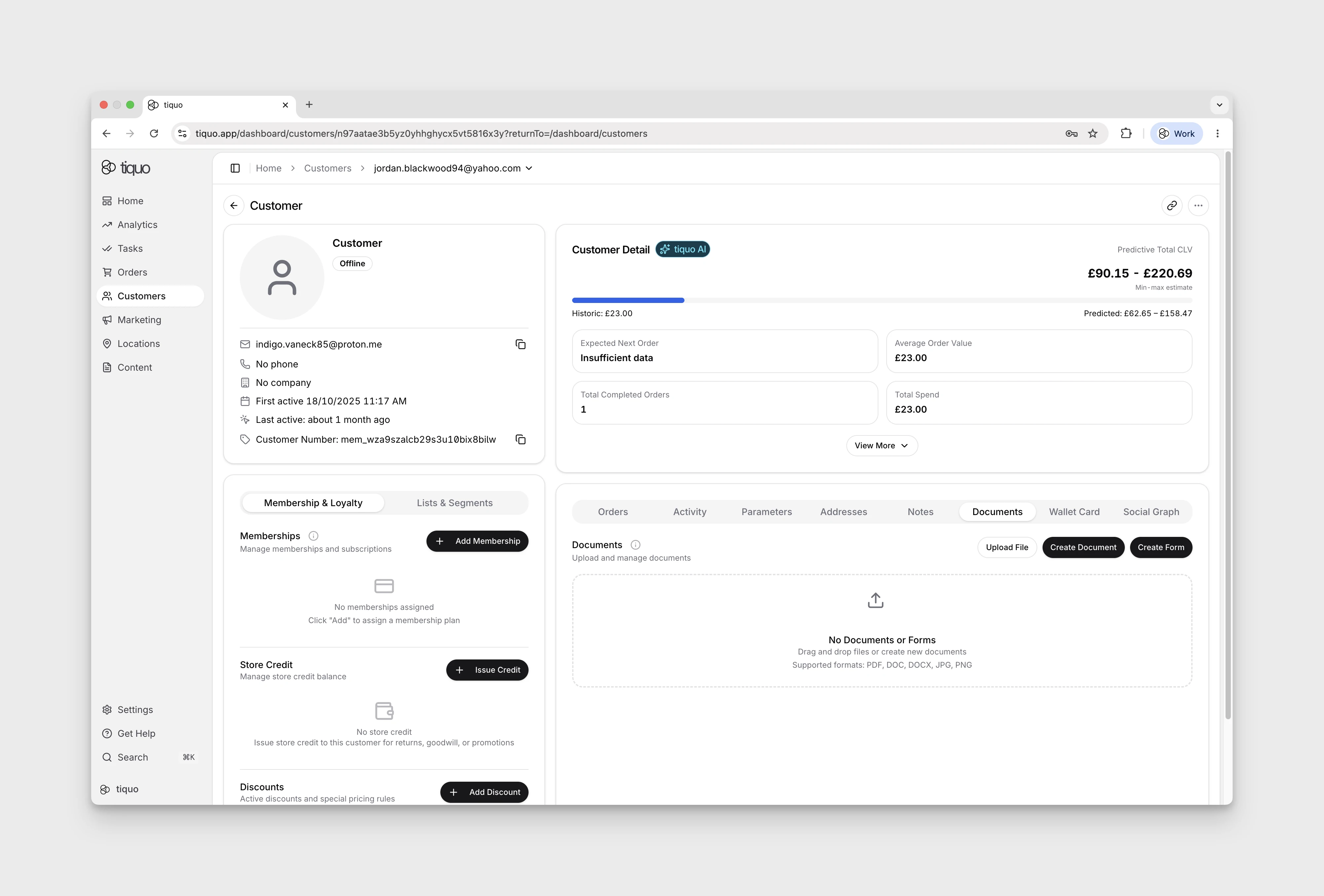
Documents are managed within the Documents section of the customer profile.

Customer profile documents tab

Document Types

The Documents section supports multiple types of records associated with a customer.

These include:

  • Uploaded files
  • Generated documents
  • Forms associated with the customer

This allows businesses to store both externally created files and documents generated directly within the platform.

Uploading Files

Staff can upload files directly to the customer profile.

Files can be uploaded by selecting Choose File or by dragging and dropping files into the upload area.

Common supported file formats include:

  • PDF
  • JPEG, PNG, GIF, and WebP images
  • DOCX, XLSX, and PPTX
  • CSV and TXT
  • ODT, ODS, and ODP

Once uploaded, files become part of the customer's stored records.

Each file can be up to 25 MB. Tiquo validates the filename extension, declared content type, stored content type, and file contents. Empty files, mismatched types, unsafe archives, and unsupported formats are rejected.

Creating Documents

Staff can create new documents directly from the customer profile.

Selecting Create Document allows a document to be generated and associated with the customer.

These documents can be used for operational, legal, or administrative purposes.

Examples may include:

  • Membership agreements
  • Customer contracts
  • Service confirmations
  • Internal documentation

Creating Forms

Staff can also create forms associated with a customer profile.

Selecting Create Form allows a form to be generated and linked to the customer.

Forms can be used for structured data collection or agreements.

Examples include:

  • Consent forms
  • Waivers
  • Customer onboarding forms
  • Membership forms

The form editor supports text and numeric single-line fields, multi-line fields, dates, times, dropdowns, addresses, files, signatures, and other structured blocks. Fields can be required, sized, and bound to customer or enquiry data.

A single-line field can be shown only when a selected dropdown field contains one of the configured source options. Dropdowns can also filter or hide their own options based on an earlier answer. These rules are enforced when a customer submits the form, so hidden answers are not saved as active responses.

Managing Customer Documents

All uploaded files, documents, and forms are stored within the Documents section of the customer profile.

Staff can view and manage documents directly from the profile.

This ensures that important records remain linked to the correct customer and can be accessed whenever needed.

Sur cette page