

Floor Plans
Visualise and manage bookable inventory through spatial layouts
Floor plan overview
Floor Plans show bookable inventory on a layout of your sublocation, with availability updated in real time. Use the layout to manage seating, allocate space, and select inventory as an alternative to calendar and list views.
Floor Plans use your existing service and inventory rules. They show availability, capacity, and booking status in real time.
Enabling floor plans for a sublocation
Floor Plans can only be enabled for sublocations that support services.
To use Floor Plans, the sublocation must be configured as either:
- A service sublocation
- A service + product sublocation
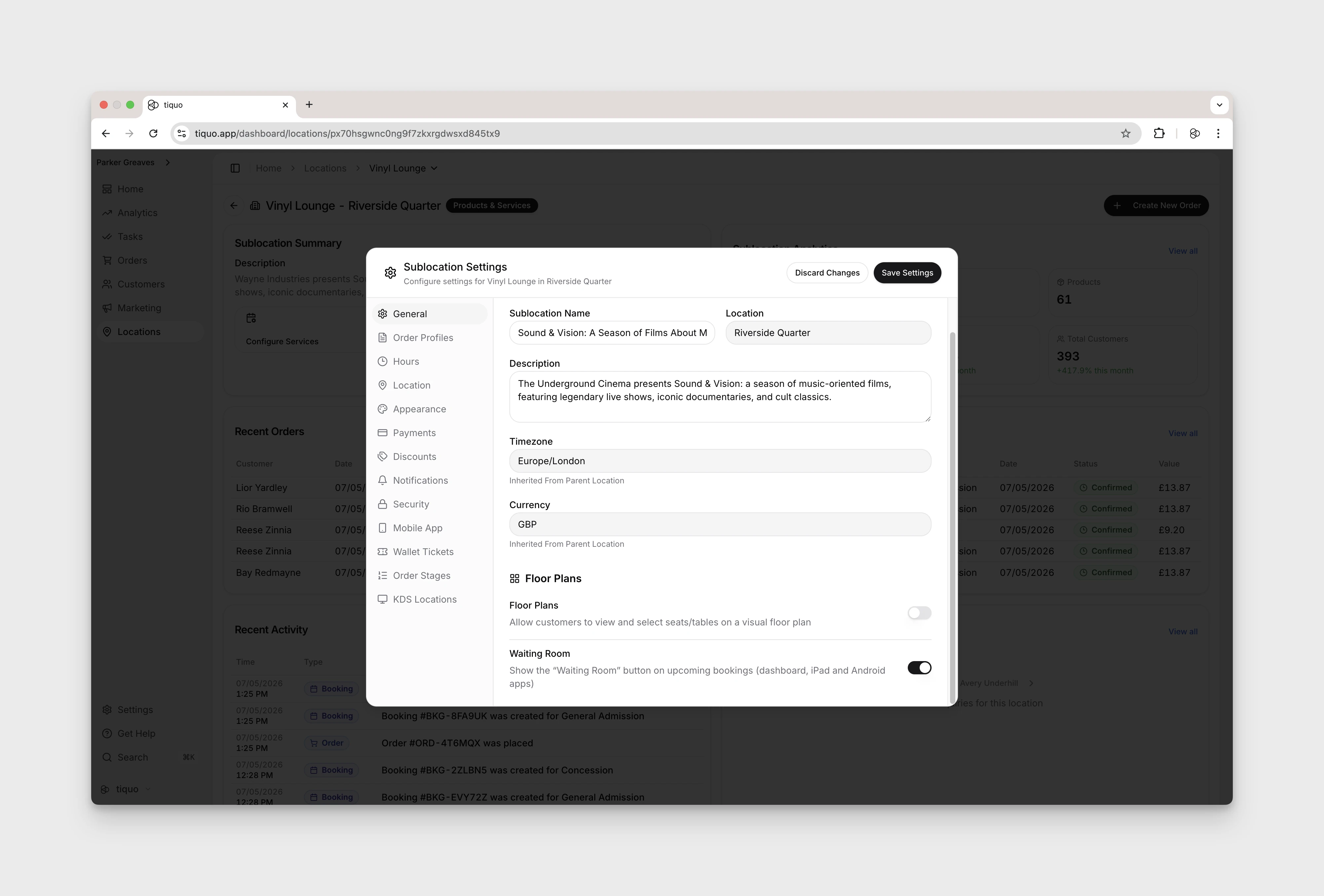
Open Sublocation Settings > General. Under Floor Plans and Waiting Room, turn on Floor Plans. The adjacent Waiting Room switch controls a separate booking feature.
Restaurant and cinema/concert/theatre templates enable Floor Plans when the sublocation is created. For other service or hybrid sublocations, enable the toggle manually.
Product-only sublocations do not show the Floor Plans controls because they do not use time-based service inventory.
Designing your floor plan
Build a layout in the Floor Plan editor using structural elements, décor, and bookable inventory. Open the sublocation workspace and use Edit inside the Floor Plan section below the calendar. The page's top-level Edit controls workspace cards. The floor-plan editor provides its own Save and Cancel controls.
These design elements help teams understand layout and flow but do not affect availability or bookings on their own.
Tables and bookable areas
Tables and other bookable areas shown on a Floor Plan must already exist as inventory instances. The Table and Chair tools can show no inventory available and remain disabled until suitable inventory is available.
Configure inventory
The table must be configured as an inventory item within the service's inventory configuration
Define rules
The inventory item defines capacity, availability, limits, and booking rules
Place on floor plan
The Floor Plan simply places that inventory instance visually within the space
This ensures that:
- Availability is consistent across calendar, list, and floor plan views
- Booking limits and capacity are enforced centrally
- Visual interaction always reflects the true booking state
Selecting a table on the Floor Plan shows its real-time availability and any bookings for the selected date.
How floor plans interact with bookings
Floor Plans act as a visual interface for the same booking engine used elsewhere in Tiquo.
When a booking is made:
- The inventory instance is reserved
- Availability updates immediately
- The Floor Plan reflects the new state in real time
Staff can use Floor Plans to:
- View availability at a glance
- Identify free or occupied tables and spaces
- Open inventory items to view booking details
- Book on behalf of customers using staff flows
Running service from the floor plan
The live floor plan is available on the dashboard and supported staff apps. Choose a date and use the timeline, status legend, and summary figures to understand current and upcoming covers without switching to the calendar.
Add a walk-in
For a walk-in on today's floor plan:
- Start a walk-in and choose the booking type, party size, and customer where applicable.
- Review the available tables suggested for the party size.
- Select a suggested table, choose another available table manually, or combine multiple available tables.
- Confirm the booking.
Suggested tables are a convenience; the same capacity, availability, buffers, and booking rules still apply. A combined booking reserves every selected table for the booking period.
Use table quick actions
On supported staff apps, open a table's quick actions to:
- open its existing order, or choose between several open orders;
- create another order or start a walk-in;
- move a complete open tab to the table;
- move selected saved products from another open tab;
- settle one order or all unpaid orders attached to the booking.
A tab can move from a different sublocation in the same organisation. The order keeps its original sublocation and payment account while using the destination booking and table as its dining context.
Move an existing booking
Open or select a booking and choose a new table. Compatible available tables are highlighted, while conflicting targets cannot be selected. The interaction is adapted to the device, including drag or long-press movement where supported.
Work with seats
Restaurant table seats are numbered from the floor plan layout. In Restaurant Mode, staff can assign order items to those seat numbers so the kitchen and service team can keep each guest's items together. Standalone bar seats remain individually bookable resources.
The floor plan also shows service timing and status cues, including late or overdue bookings, using the venue's local time.
Indoor navigation coming soon
For large sublocations or layouts that span multiple rooms, Indoor Navigation will help staff see their approximate position directly on the floor plan in the Tiquo Staff app.
Tiquo beacons placed throughout the space provide nearby location signals to a staff member's device. The app uses these signals to estimate where the staff member is within the sublocation and displays their position on the floor plan. This makes it easier to get oriented, move between rooms or zones, and find tables and other bookable areas quickly.