

Settings
Organisation-level configuration across account, platform, developer, and setup areas
Settings is the organisation-level configuration overlay. It is distinct from Sublocation Settings, which controls one operational sublocation.
Open settings
- Click the gear icon at the bottom of the main sidebar.
- Choose a section and setting from the navigation on the left.
- Enter a term in Search settings..., then select a matching result. For example, search for discount and choose Discounts Platform to open Discounts.
The tabs shown to each user depend on their permissions, organisation features, and preview access. A user may therefore see fewer entries than the full list below.
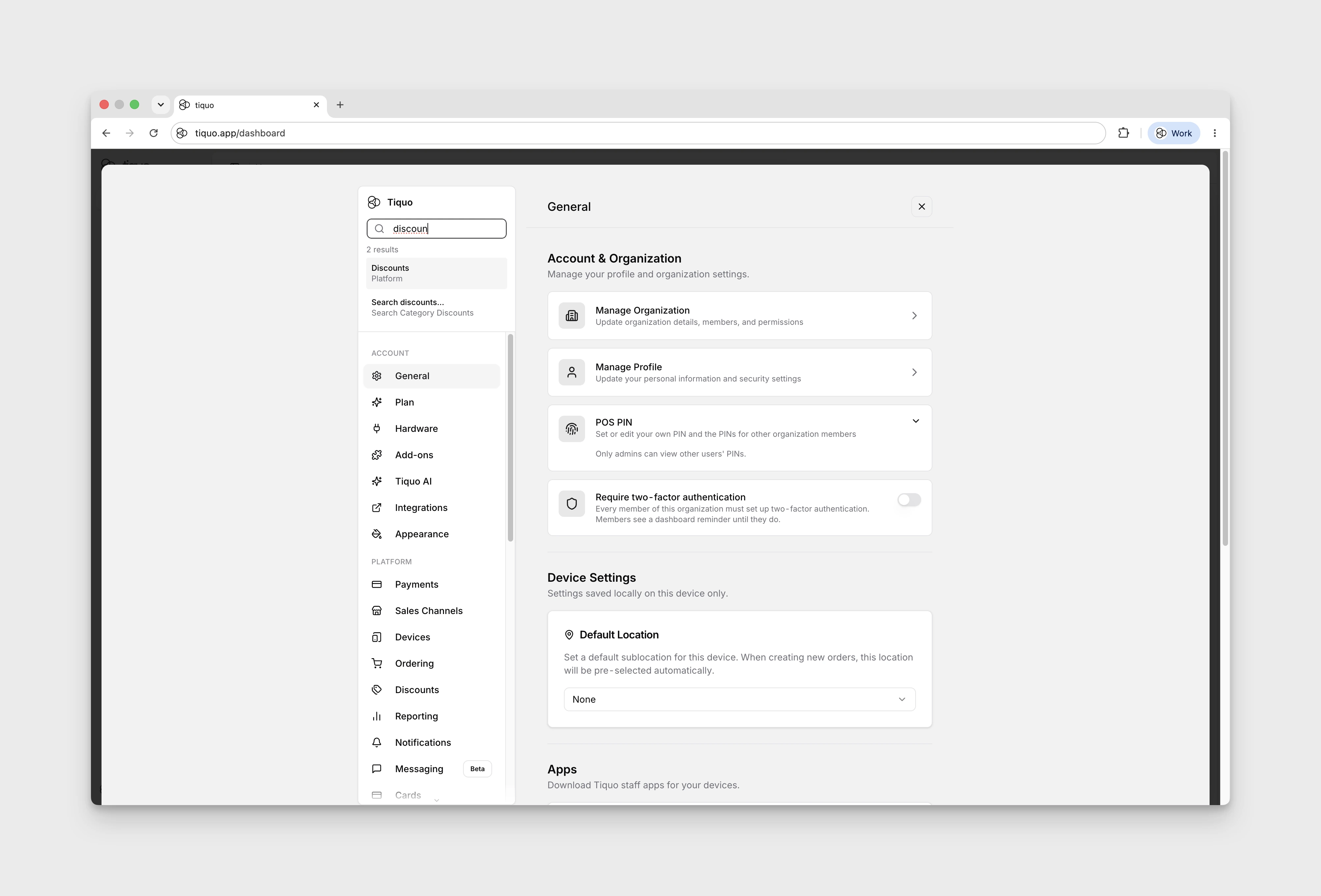
Account
The Account section appears first:
- Moving to Tiquo: access migration and onboarding tools available to the organisation.
- General: manage the organisation, personal POS PIN, and organisation-wide account controls. Administrators can also manage POS PINs for other members here, and add people without a Tiquo account who sign in on POS devices with a PIN. See Personal POS PINs.
- Plan: review plan and billing information. The Tiers card shows each plan's starting card rate, such as From 1.2% + £0.18 for Scale. More information opens Tiquo's full fee schedule, with a currency switch, and Compare opens the plan comparison. See Subscription & Fees.
- Hardware: view supported terminals, printers, scanners, accessories, and purchasing options. See Devices Overview.
- Add-ons: manage optional platform add-ons available to the organisation.
- Tiquo AI: manage organisation AI features, such as Euclid and Company Intelligence. See Tiquo AI.
- Integrations: connect and manage external services.
- Appearance: manage organisation themes and branding. See Themes.
Platform
The Platform section contains operational organisation settings:
- Payments: view the organisation payment area, including connected-account information and payment reporting available to the user. Each connected account also has Document numbering for invoice, credit note and receipt prefixes; changing it needs the Manage organization settings permission. See Payments and Document numbering.
- Sales Channels: manage terminal and travel-platform sales channels.
- Devices: review active application devices, till displays, and registered Stripe Terminal readers; register readers by pairing code and assign them to sublocations.
- Ordering: configure Order & Pick Up and Order to Table. See Table & Pick Up QR Tags.
- Discounts: manage organisation discount rules.
- Reporting: manage the standard reasons offered when staff ban a customer, cancel a membership, issue a refund, mark an enquiry Lost, or record wastage. Staff can still enter Other where that workflow supports it.
- Notifications: configure organisation defaults for automated customer emails.
- Messaging: messaging controls currently marked Beta.
- Cards: design Apple Wallet, Google Wallet, and printed cards.
- Cloakroom: manage cloakroom tag designs and assignments. See Cloakroom.
- Customer Portal: configure customer-facing portal options.
- Customer Parameters: define custom customer fields.
- Membership & Loyalty: manage membership plans. See Memberships.
- Passes/Packages: create and archive Access Pass and Guest Pass types. Individual passes are issued from customer profiles or included with memberships. This area is labelled Beta.
- Registration: set default customer access by sublocation, choose guest allowances, and create Guest Pre-Registration flows. The Guest Registration section is labelled Beta. See Customer Registration for how these settings affect registration at the front desk.
- Tasks & Notes: manage task and note categories and their assigned staff. This tab needs the Manage task & note categories permission.
- Enquiries: manage enquiry types, type-specific fields, pipelines, and stages. Staff access to individual enquiry types is managed under Manage Organization > Enquiry access.
- Documents & Forms: manage document and form templates.
Developer
- Domains: manage the domain configuration available to the organisation.
- Admin API: create and manage server-side API keys.
- IDP: configure OAuth/OIDC identity-provider settings and OAuth clients.
- Website SDK: configure the DOM Package for customer authentication on external websites.
Setup
- Languages: choose your dashboard language and time format, and the organisation's number format, date format, and first day of the week. See Language and formats.
- Policies: manage organisation policy content.
- Legal: read Tiquo’s legal documents. The Subprocessor Policy is locked by default: request access within the platform using the button next to the policy. Access is enabled per organisation after Tiquo approval. See Subprocessor Policy access.
- Import & Export: move supported data into and out of Tiquo. See Import & Export Data.
Tiquo AI
Tiquo AI lists the AI features available to the organisation, grouped by area. It needs the Manage organization settings permission. Most features have a switch and are on until someone turns them off; the switch applies to the whole organisation.
- Euclid: turn the dashboard assistant on or off. Euclid is in beta. See Euclid.
- Customer Notes Summary: summarises a customer's notes and outstanding tasks. See Customer Notes Summary.
- Customer Activity Summary: summarises a customer's recent activity on their profile. See Customer Activity Summary.
- Advanced Duplicate Matching: decides whether a customer import row whose email is already on a profile is the same person. See Shared emails from imports.
- Smart Transaction Matching: connects transactions to customers who haven't identified themselves. It is always active and has no switch. Small fingerprinting or tokenisation charges may apply.
Language and formats
Languages in the Setup section has two kinds of setting:
- Select Language and Time Format are personal. Until you choose a time format, Tiquo uses 12-hour time for English and Hindi and 24-hour time for other languages.
- Number Format, Date Format, and First Day of Week apply to everyone in the organisation, on the dashboard and in the Tiquo apps. Until someone saves a choice, everyone sees 1,234.56, DD/MM/YYYY, and Monday, whatever language they use Tiquo in.
Date of birth fields follow the organisation's date format: day first for DD/MM/YYYY and DD.MM.YYYY, month first for MM/DD/YYYY, and year first for YYYY-MM-DD and YYYY/MM/DD.
Sublocation-specific settings
Open Locations, select the sublocation, then choose Sublocation Settings. Use Hours for operating hours, Location for its address, Payments for its connected payment account, General for order creation and floor-plan settings, and Mobile App for mobile display options.
KDS Locations is also available here, but KDS locations are shared across sublocations under the same parent location. Its ticket-layout settings apply only to the current sublocation.
Agreement revisions
Organisation administrators can review the current Tiquo and Stripe agreements and accept the revisions presented in the platform. Acceptance history is retained. Reopen the agreement when a new revision needs review instead of relying on an earlier acceptance.