

Order Items
Understanding the individual items contained within an order
Order Items represent the individual items contained within an order.
Each order item corresponds to something a customer has purchased. Order items can represent either retail products or time-based service bookings.
Order items allow Tiquo to track both the operational and financial details of each purchased item within a transaction.
Where order items appear
Open Orders and select an order row to open the Order Details preview. Its Order Items section shows the items associated with that order. See Orders for the full order detail workflow.
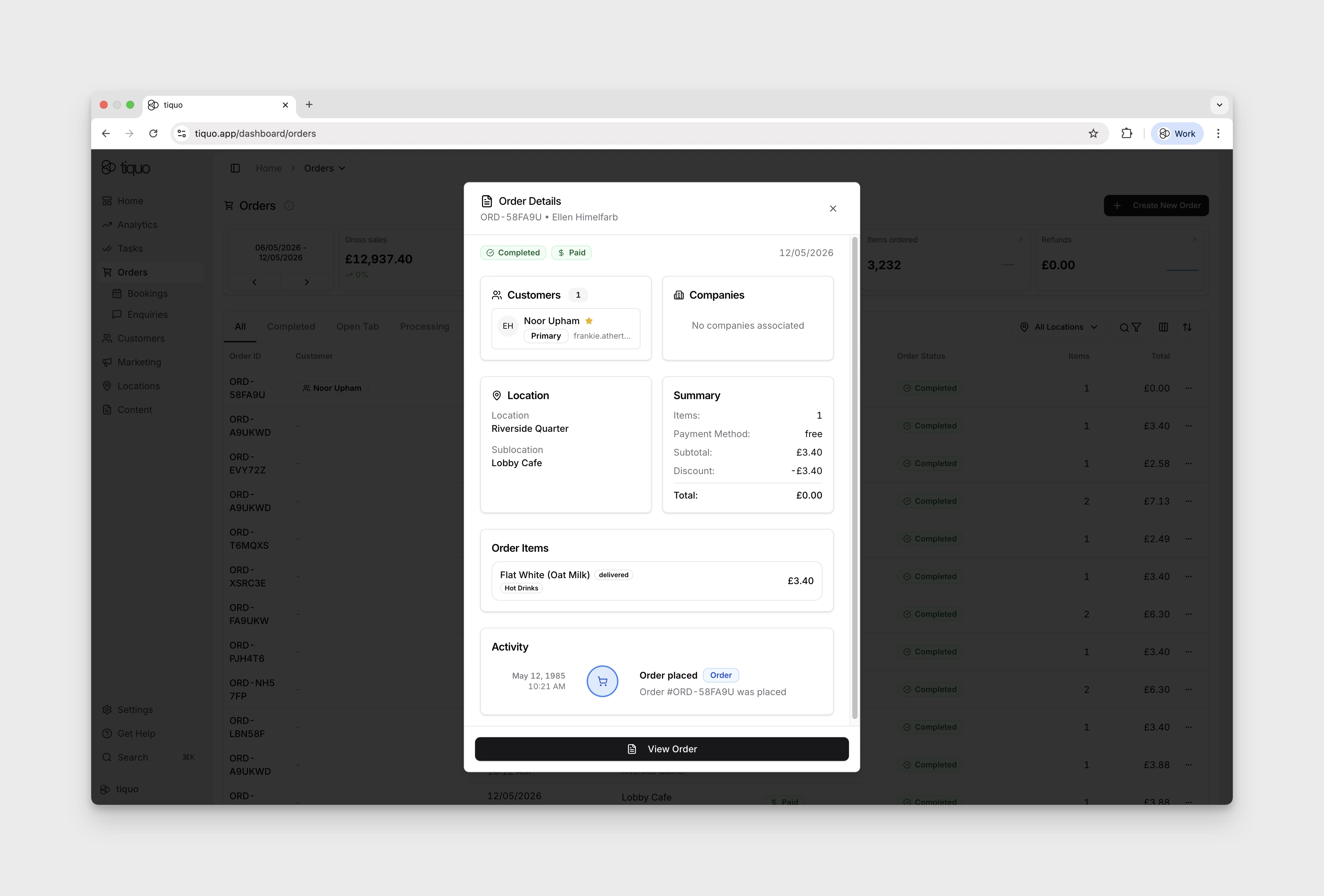
Select View Order at the bottom of the preview to open the full order page. The Items tab separates Products and Services and shows the order subtotal, tax, and total.
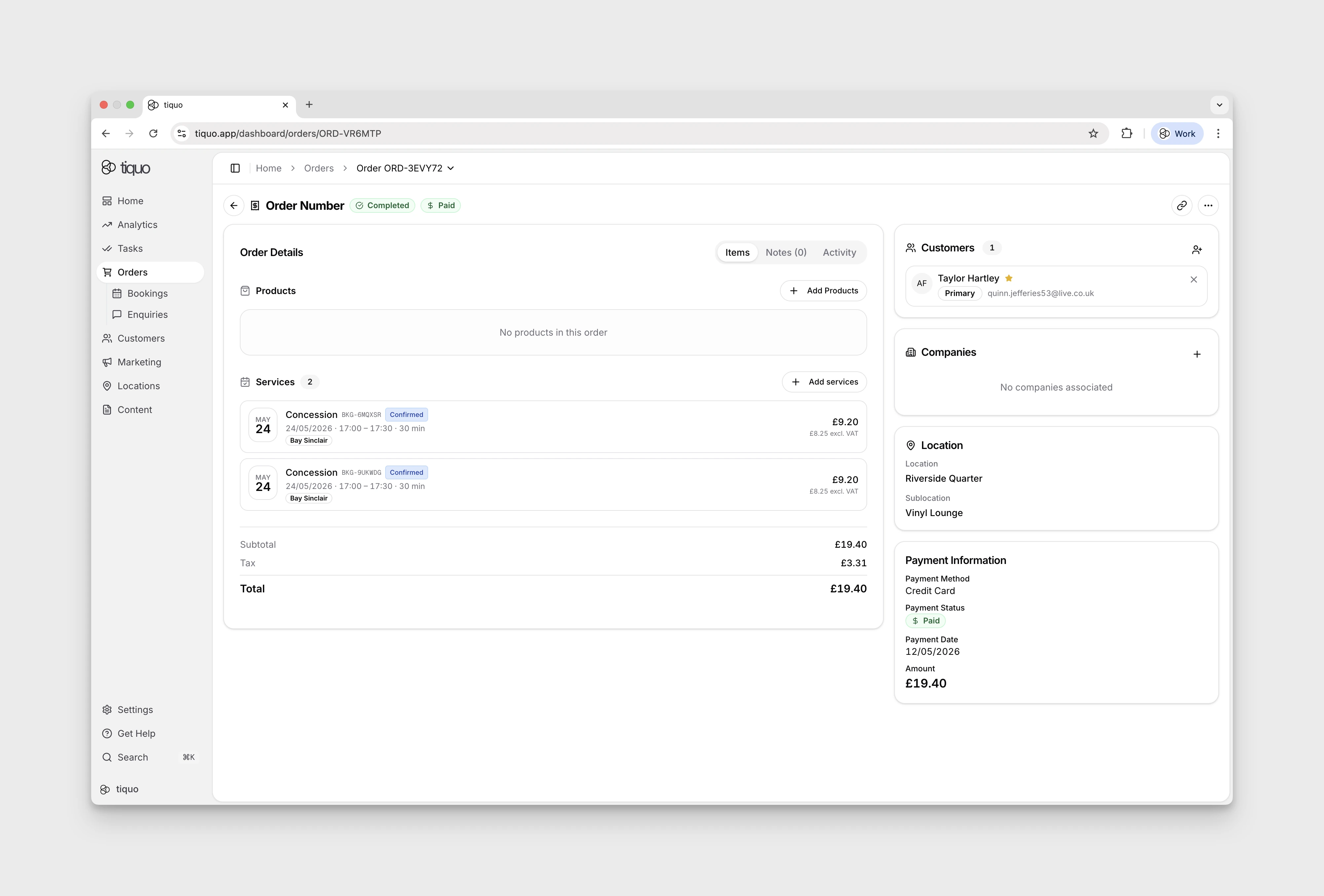
Types of order items
Order items can represent two types of items:
Products
Products represent retail or physical items sold by a business.
Examples include:
- Drinks
- Food
- Merchandise
- Retail goods
- Equipment rentals
Products can be added directly to an order. Products are non-time-based items and do not create bookings.
Bookings
Bookings represent scheduled services. Any time-based service in Tiquo is managed as a booking.
When a service is scheduled, the booking appears inside the order as an order item.
Examples include:
- Massage appointment
- Meeting room booking
- Fitness class
- Workshop session
The booking contains the operational scheduling details, while the order item represents the commercial record of the purchase.
Order item information
Each order item contains key information about the purchased item.
Typical order item data includes:
- Item name
- Item type (product or booking)
- Quantity
- Unit price
- Subtotal
- VAT rate
This information determines the final price of the order.
Quantities
Products can have quantities greater than one.
Example: Order item Lemonade, Quantity: 3
Bookings typically represent scheduled services and therefore appear as a single item.
Pricing
Pricing for each order item is calculated individually.
Each item contains:
- A unit price
- An applied VAT rate
- A calculated subtotal
The order total is calculated by summing the values of all order items.
VAT
VAT can be applied per order item.
The configured VAT rate for the item determines the tax amount included in the order.
Example: Item price: £20, VAT rate: 20%
The system calculates the VAT portion automatically.
Fulfillment
Order items track fulfillment separately from payment.
Fulfillment represents whether the item has been delivered or completed.
Examples include:
- Food delivered to a table
- A product handed to the customer
- A service appointment completed
When an item is delivered or completed, the fulfillment is confirmed.
Inventory behavior
Inventory interacts directly with order items.
Stock updates
For tracked products, stock is deducted when the order or newly added item is saved. Editing an order adjusts stock from the previous saved quantities to the new quantities. Removing an item, cancelling or refunding the order, or transitioning an eligible customer cart to Lost Cart restores the applicable quantity.
Voiding a product on an open tab also restores its quantity. The voided line stays on the order, struck through and marked Voided. A product recorded as wastage stays deducted, because it was made. See Voiding products on an open tab.
A line that is only partly refunded is split into two rows: one for the units still sold and one, marked Refunded, for the units returned. See Refunding an order.
Fulfilment is separate from inventory accounting. Marking an item delivered does not perform a second stock deduction, and leaving an item undelivered does not by itself restore stock.
Order items and bookings
Bookings appear in orders as order items.
The relationship works as follows:
Service → Booking → Order Item → Order
The booking manages the operational schedule and resource allocation, while the order item represents the commercial transaction.
Example:
Order:
- Massage Appointment (booking)
- Herbal Tea (product)
- Face Cream (product)
You can include services and retail purchases in a single transaction.
Order item lifecycle
Order items typically move through the following operational lifecycle:
Item added to order → Item prepared or scheduled → Item delivered or completed
When all order items in an order have been fulfilled, the order is considered operationally complete.
Order items and reporting
Order items contribute to platform analytics.
| Metric | When Counted |
|---|---|
| Items Ordered | Items are counted in reporting when they are added to an order |
| Revenue | Revenue is recognized when payment is received |