
Tiquo
Integrations OverviewAirtableAsanaSlackGoogle AnalyticsMetabaseMixpanelPendoSegmentTableau (PAT)ActiveCampaignBrevoEmarsys Core API (WSSE)EventbriteFacebookGoogle AdsHighLevelInstagramKlaviyoMailchimpMailgunMicrosoft AdsSendGridTwitter (v2)HubSpotNotionAcuity SchedulingAirtable (Personal Access Token)BasecampCal.com (v2)CalendlyClickUpCodaConfluence Data CenterExpensifyGoogle CalendarGoogle SheetHarvestLinearMicrosoft Power BIMicrosoft TeamsMindbodyMondayOpenAIPerplexityPingboardPivotal TrackerProductboardQuickbaseServiceM8ServiceNowTeamworkTickTickTimelyTodoistTrafftTrelloWrikefal.aixAIZendeskIntercomAircall (OAuth)DixaFreshDeskFreshserviceFrontPlainRingCentralZoho DeskBrazeDialpadGoogleMicrosoftOutlookPodiumSednaSharePoint OnlineTwilioWhatsApp BusinessZoho MailBambooHRADPDeelEmployment HeroGustoHibob Service UserNamelyOracle Fusion Cloud (HCM)PaychexPayfitPaylocityPersonioRipplingSAP SuccessFactorsSage HRTSheetsUKG ProUKG ReadyWorkdayZoho PeopleQuickBooksBuildiumExact OnlineFreshBooksIntuitNetSuitePennylaneSageSage IntacctTwinfieldUnanetWave AccountingXeroZoho BooksSalesforceAffinityAttioCopperFreshsalesGainsight CCInsightlyKustomerMedalliaPipedriveTwenty CRMZoomInfoApaleoMewsMicrosoft Business CentralOdooSAP ConcurZuoraAcceloCoupa CompassZoho InvoiceAnrokAvalaraDocuSignDropbox SignPandadocSignNowLinkedInSplitwiseTikTok AdsJotformQualtricsRefinerTypeformShopifyCin7 CoreGoogle MapsRingoverListrakRydooTalentLMSApple Business ManagerCrunchbaseRocketReachOcean.ioFreepikEnergy Performance Certificates (Gov.UK)JustworksGristSAP S/4HANA Cloud3CX8x8Adobe CommerceBirdCloudbedsConstant ContactBufferCustomer.ioCrispFreeAgentGreenhouseMeta Marketing APIMollienocrm.ioOomnitzaDigitsPylonSage 200ShopwareAnvilShippoEasyPostAltrataMicrosoft PeopleMicrosoft IntuneCloudTalkGoogle FormsMaximizerMicrosoft PlannerSalesmsgSellercloudTallyTimifyUpsalesCleverReachHeymarketMailjetPleoProvenExpertTelegramToggl TrackASSA ABLOY Vingcard VisionlineASSA ABLOY Vingcard VostioASSA ABLOY TESA HotelASSA ABLOY SMARTairSalto KSSalto Space OnlineDormakabaOmnitecHotekTT LockWebLockISEOKleverKeyAperioISONASHIDSouthcoThird MillenniumSTidAxis CommunicationsBooking.comExpediaHotels.comAirbnbGoogle HotelsTripadvisorAgodaHotelbedsTravelgateXHyperguestRoibosReconlineTraviaOpenGDS.comMG BedbankDidatravelHotelREZHRSHotelnetworkGetaroomWinkBookeasyVRBOInntopiaHookusbookusHipcampSpot2niteCamping VisionMinistry of VillasTrip.comTravelokaTiketMakeMyTripHoteripKlookeDreamsSzallasEmerging Travel GroupCheck24Bed-and-Breakfast.itWorld2Meet (W2M)Ctoutvert / SecureholidayDespegarPriceTravelRoombeastMitchell CorpHRS AustraliaResonlineHostelworldHostelhopTablet MichelinMr & Mrs SmithHopperHotel TonightPitchupMoveriiLocalOTAAlaricBooknpayCultbookingGuestTractionLevartWeSpeakMake.comZapierPricelabsPricepointRategenieElastic HotelRoom Price GenieTurbosuiteUber EatsDeliverooDoorDashBolt Food
PlatformConfigure Products

Product Inventory

Track product stock, configure thresholds, manage stock ownership, and control out-of-stock sales

Product inventory tracks the sellable stock held by a sublocation. It is configured separately for each product, so products can be tracked, sold without stock limits, or handled through stock groups according to the way the business operates.

Enabling Inventory Tracking

Open a product from Configure Products, then use its Inventory settings to:

  • Enable or disable inventory tracking
  • Set the current stock level
  • Define a low stock threshold
  • Allow or block backorders when stock reaches zero

If inventory tracking is disabled, the product can be sold without a stock limit. When tracking is enabled, inventory updates automatically as products are sold through orders.
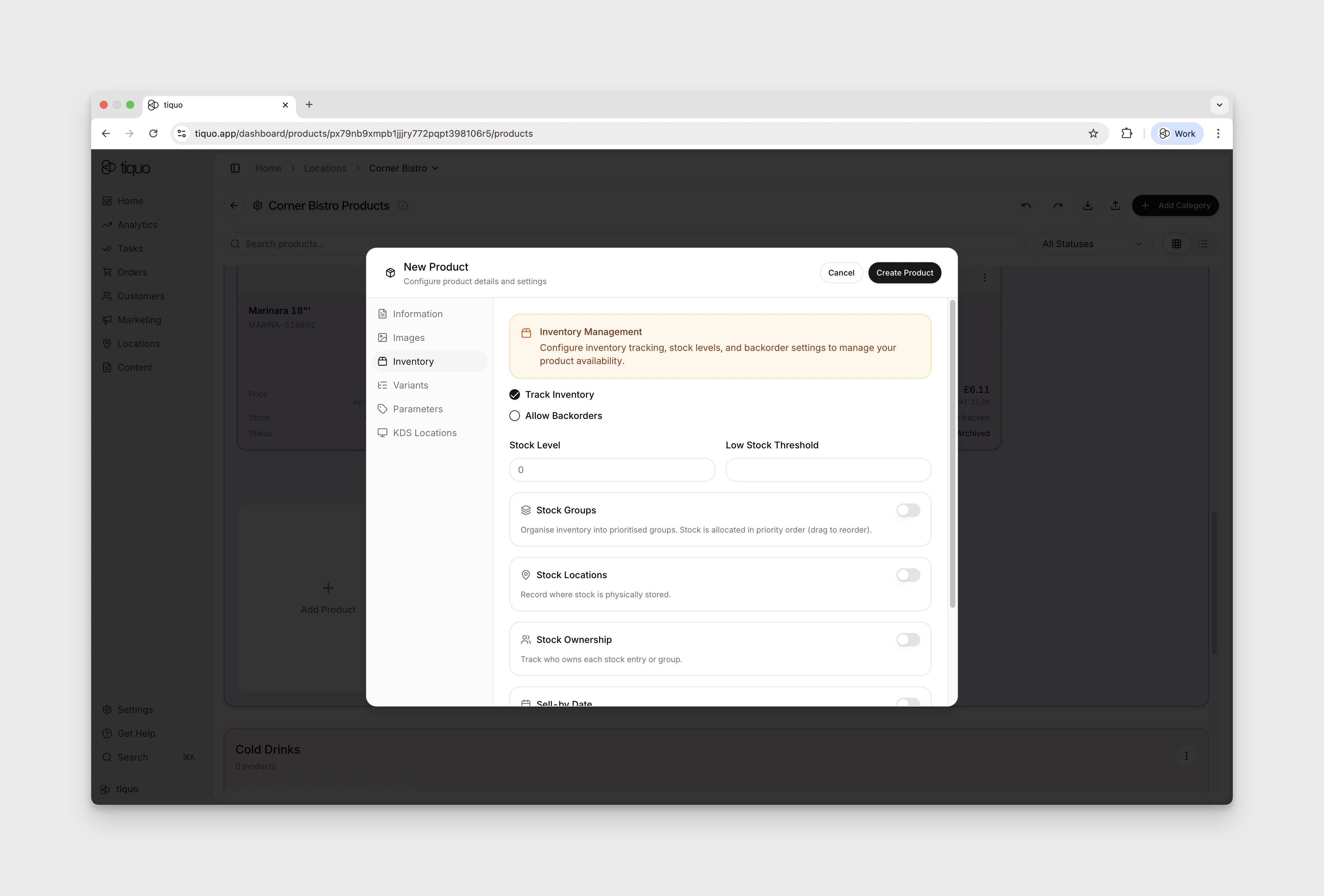
Product inventory settings

Low Stock and Sold Out Alerts

When Track Inventory is enabled and a Low Stock Threshold is set, the Configure Products grid displays an alert badge on the product card:

  • Low stock appears when stock is above zero but at or below the configured threshold.
  • Sold out appears when no sellable stock remains.

For products that use Stock Groups, configure the threshold separately on each group. A stock-group alert appears when any group reaches its threshold, and the product is marked Sold out when all sellable stock across its groups is gone.

Stock Ownership and Consignment

Enable Stock Ownership when stock belongs to a specific owner rather than only to the sublocation. Stock can be recorded as:

  • Owned by Sublocation
  • Owned by Customer
  • Owned by Company

When stock groups are disabled, ownership applies to the product stock entry. When stock groups are enabled, each group can have a different owner. Customer-owned and company-owned stock also appears on the corresponding profile under Owned/Consigned Products.

Inventory During Checkout

Tracked stock is reserved during checkout. If a customer abandons the cart before completing the order, the reserved quantity is restored. Blocking backorders prevents new sales when the available quantity reaches zero.

Return to Configure Products Overview for product creation, categories, pricing, VAT, variants, and channel availability.

Sur cette page