

S700/S710 Dock
Countertop charging dock for S700 and S710 payment terminals
Device overview
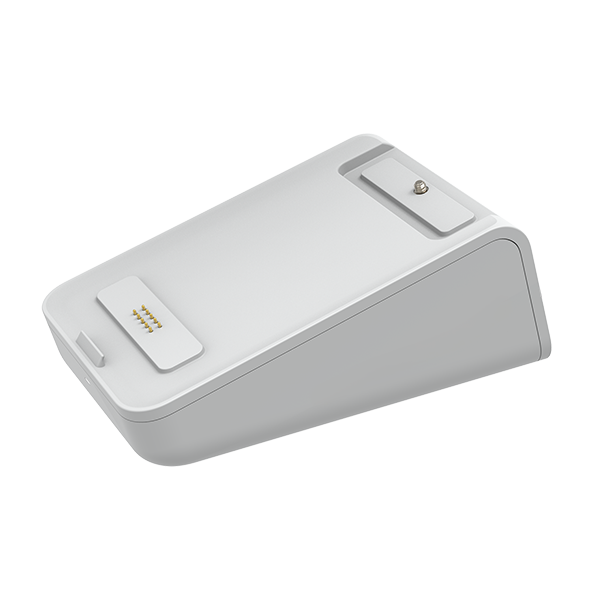
The S700/S710 Dock is a countertop charging dock for Stripe S700 and S710 payment terminals. It keeps the reader charged, provides a fixed counter position, and supports cleaner cable routing for front-of-house payment points.
Pricing
Open Settings → Hardware and choose GBP, EUR or USD to see current prices and availability. Taxes are shown separately.
Best for: Fixed counters where S700 or S710 terminals need to remain charged and easy to access.
Key specifications
| Specification | Details |
|---|---|
| Compatibility | Stripe S700 and S710 readers |
| Charging | Reader charges through pogo pins when placed on the dock |
| Communication Interface | USB 2.0 through pogo pins |
| Connectors | USB-C port and pogo pins |
| Pogo Pins Output | PD 9V, 12W |
| USB-C Input | PD 9V, 12W |
| Security | Reader can be secured with an M4 locking bolt |
| Cable Routing | USB-C cable can route through the rear or front channel |
| Dimensions | 143.4 x 82 x 57.9 mm |
| Weight | Approx. 500 g |
| Operating Temperature | 0°C to 40°C |
| Operating Humidity | 10% to 90%, non-condensing |
Setup
Position the dock
Place the dock on a stable countertop where staff can easily reach the terminal.
Route the cable
Route the USB-C cable through the rear or front cable channel, depending on the counter layout.
Connect power
Connect the USB-C cable to a supported power source.
Place the reader
Place the S700 or S710 reader on the dock and confirm it begins charging.
Secure if required
Use the M4 locking bolt if the reader needs to be secured to the dock.